

CPU Cooler screenshots (3)
Description CPU Cooler
Ever notice your phone getting uncomfortably warm during a long gaming session or while running multiple apps? That heat is more than just an annoyance; it’s a sign your device is under stress, which can slowly degrade its battery and overall health over time. Managing that temperature becomes a silent daily task, one that CPU Cooler is designed to handle for you. This tool provides a direct window into your device's thermal state, allowing you to take control and cool things down with a single action, ensuring your smartphone runs efficiently for longer.
Take Control of Your Phone's Performance and Health
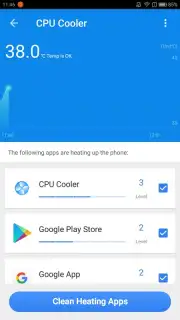
CPU Cooler transforms you from a passive user into an active manager of your device's well-being. You gain immediate insight into which specific applications are generating excessive heat, often without you realizing it. The interface presents a clear list of these resource-intensive processes, putting the power to decide in your hands. With one tap, you can choose to close all non-essential apps simultaneously or selectively keep the ones you need running. This proactive approach helps maintain optimal operating temperatures, directly contributing to prolonged battery lifespan and preventing the performance throttling that often accompanies overheating.
Key Features at a Glance
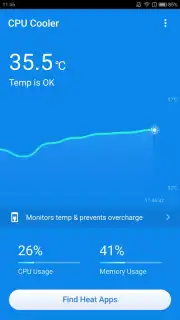
- Real-Time Temperature Monitoring: Keep a constant eye on your device's internal temperature with a clear, always-accessible display within the app.
- One-Tap Cooling Action: Reduce your phone's temperature instantly by terminating unnecessary background processes and apps with a single button press.
- Detailed Process Analysis: View a comprehensive list of all running applications and services, identifying exactly which ones are consuming excessive resources and generating heat.
Regular use of this application helps your smartphone operate within safe thermal limits. By preventing excessive heat buildup during intensive tasks like gaming or multitasking, you actively work to extend the functional life of your device's core components. The tool is designed for daily use, integrating seamlessly into your routine to ensure consistent performance without the intrusive presence of advertisements.
We suggest trying CPU Cooler to maintain your device's health and experience smoother, cooler performance during every use.
Download the CPU Cooler mobile app now.
Disclaimer: This application requires an active internet connection for initial functionality checks and potential updates. The app is free to download and use; please be aware of any in-app purchase options for additional features. Use is subject to the terms of the developer and digital distribution platform. Data usage may apply when fetching application information. Always ensure your device meets the required system specifications for optimal performance.
Information
| Version | 1.0.4 |
| Developer | Uptodown.com |
| Requirements | Android Android + 4.0, 4.0.1, 4.0.2+ |
| Updated | 17.03.2026 |
| Size | 3.23 MB |
| Package | com.toptec.cupcooler.app |
| Signature | b418a992b8f47ea2f66509de5e8369d9 |


