

Date Widget screenshots (5)
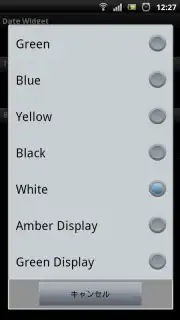
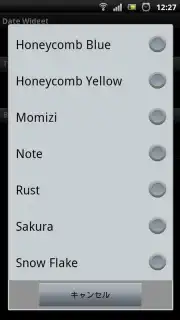
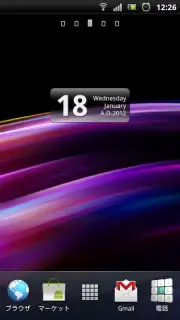
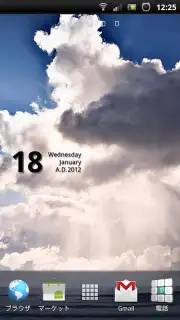
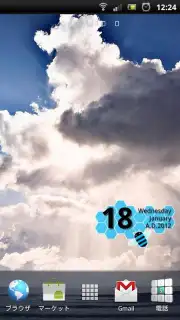
Description Date Widget
Your Home Screen, Finally Complete
You know that feeling when your phone's home screen is almost perfect? The wallpaper is stunning, the icons are neatly arranged, but something is missing. It feels a little empty, a little impersonal. You glance at the date and realize it’s just a tiny, bland line of text tucked in a corner, completely disconnected from your style. That’s the moment you need Date Widget. This isn't just another utility; it's the finishing touch that transforms your Android's main screen from a functional space into a personal statement. Imagine a sleek, beautifully integrated date display that looks like it was designed specifically for your wallpaper, blending so seamlessly it feels like a native part of your device's aesthetic.
A Canvas for Your Personal Style
Date Widget hands you the creative controls to design a date display that is uniquely yours. Forget about one-size-fits-all solutions. This app understands that personalization is in the details. You can dive into a rich suite of customization options, tweaking every visual element until the widget looks like it was always meant to be there. Change the text color to match your theme, select a font that reflects your mood—be it elegant, modern, or playful—and even adjust the date format to show exactly the information you want at a glance. The magic happens when you set a custom background image for the widget itself, allowing it to melt into your wallpaper for a harmonious, layered look that feels incredibly sophisticated.
The integration goes beyond mere looks for a truly smart experience. With a simple tap on the widget, you’re not just admiring it; you’re interacting with it. You can jump straight into its settings to make a quick change, or launch directly into your Android calendar app to check your schedule. This seamless bridge between glanceable information and actionable utility makes your daily routine smoother. The developers have poured attention into the subtleties, too. You have precise control over shadow colors, transparency levels for both the widget and its background, and display fine-tuning to ensure perfect alignment, especially on high-resolution screens. The result is a widget that feels polished, intentional, and completely free of visual glitches or awkward offsets.
Built to Evolve With You
A great app doesn't stand still, and Date Widget is committed to continuous refinement. Recent updates are a testament to this, focusing squarely on enhancing your experience. They’ve streamlined the display settings for even easier management, squashed memory-related bugs for smoother performance, and fixed initial display quirks so everything looks perfect right from the first launch. This dedication means the widget isn't just a static decoration; it's a reliable, evolving tool that gets better over time. The absence of ads ensures this clean, focused experience remains uninterrupted, letting the beauty and functionality of your creation take center stage every single day.
Why Your Home Screen Needs This Widget
- Total Visual Control: Customize text color, font, format, and background image for perfect harmony.
- Deep Android Integration: Tap the widget to quickly access settings or launch your calendar app.
- Pixel-Perfect Display: Enjoy flawless alignment with no visual offsets, even on high-res screens.
- Subtle Aesthetic Tweaks: Fine-tune shadow effects, transparency, and background blending.
- Clean, Uninterrupted Experience: No advertisements clutter your view or disrupt your customization flow.
We suggest trying Date Widget today. It’s the simplest way to add a layer of personalized, functional elegance to your Android device. Consider downloading it now and see how a single widget can make your entire home screen feel more cohesive, stylish, and uniquely yours.
Download the Date Widget mobile app now.
Disclaimer: This application requires an internet connection for initial download and updates. The app integrates with your device's native calendar application; full calendar functionality is dependent on this pre-installed system app. Please be aware of your data plan terms. The app may contain in-app purchase options. Always ensure your device meets the required system specifications for optimal performance.
Information
| Version | 1.3.1.2 |
| Developer | Randomwork |
| Updated | 17.03.2026 |
| Size | 288.82 KB |
| Package | jp.nextstage.widget02 |
| Signature | bdb1db0aad2d7eb34af5ff8470639d0b |


