


Disk Usage & Storage Analyzer screenshots (5)
Description Disk Usage & Storage Analyzer
Your Phone's Hidden Clutter, Visualized and Conquered
You know that nagging feeling when your phone warns you that storage is almost full? You scramble to delete a few photos, maybe an old video, but it's a temporary fix. The real problem is hidden—a sprawling, invisible landscape of forgotten downloads, redundant cache folders, and files you didn't even know existed. Manually hunting through folders is a tedious chore. What you need is a map. Disk Usage & Storage Analyzer becomes that essential map, transforming your abstract storage anxiety into a clear, visual, and actionable plan. It doesn't just list files; it paints a picture of your storage, making the cleanup process intuitive and surprisingly satisfying.
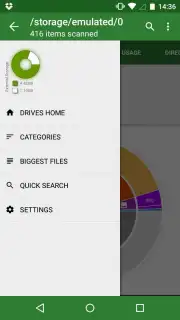
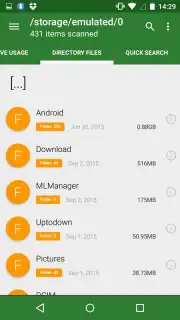
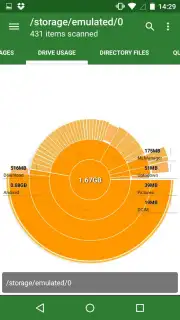
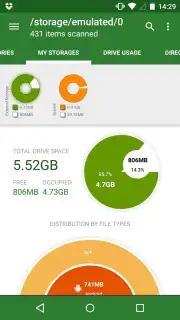
This tool goes far beyond a simple file manager. Upon opening the app, you are immediately presented with a dynamic, color-coded chart that breaks down your entire internal storage. This isn't just a list of numbers; it's a graphical hierarchy where each segment represents a category like videos, images, applications, or audio. The largest consumers of space are instantly obvious. A single tap on any segment drills down, revealing the specific files within that category, sorted by size. You can then identify and remove those massive, forgotten video files from messaging apps or clear out accumulated app cache with one decisive action. The power lies in this visual approach—you target the bulk of the problem first, saving significant space without sifting through thousands of unrelated documents.
Furthermore, Disk Usage & Storage Analyzer provides complete storage oversight by extending its analysis to any external SD card or expandable memory. Switching to this view presents a separate, interactive graph dedicated to the external media. This allows you to manage and clean files across all storage volumes from a single application interface, ensuring no redundant or heavy file is left occupying precious space, whether internally or externally. It acts as a unified command center for your device's entire digital footprint.
- Interactive Storage Visualization: See your phone's memory usage as an engaging, multi-colored chart, making large files and bloated categories visually apparent at a glance.
- One-Tap Bulk Cleanup: Quickly identify and delete entire groups of files, such as temporary cache folders or auto-downloaded media from social apps, reclaiming gigabytes with minimal effort.
- Dual-Storage Management: Analyze and clean not only your device's internal storage but also any connected external SD card, with a dedicated visual interface for each storage type.
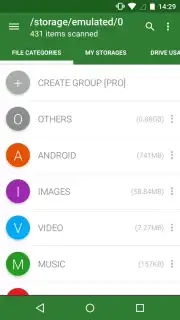
- Smart File Categorization: Files are automatically sorted by type (video, image, app, document) and size, enabling you to target the most space-hungry items first for maximum efficiency.
- Turbo-Enhanced Experience: An optional upgrade removes all advertisements and unlocks premium features, providing an uninterrupted, streamlined cleaning process.
Stop guessing what's filling your phone. Transform storage management from a frustrating task into a quick, visual operation. Get the clarity and control to permanently banish storage warnings.
Download Disk Usage & Storage Analyzer now and reclaim your space.
Disclaimer: This application requires an internet connection for certain functions and potential updates. The app may offer in-app purchases, including a Turbo upgrade to remove advertisements. Use of this tool should be in accordance with the device manufacturer's guidelines and is intended for users over a standard age rating. Data usage may apply when downloading the application and during its operation. Always ensure you review file details before deletion.
Information
| Version | 4.1.8.54.free.release |
| Developer | Mobile Infographics |
| Requirements | Android Android 7.0+ |
| Updated | 15.09.2026 |
| Size | 9.02 MB |
| Package | com.mobile_infographics_tools.mydrive |
| Signature | c94387967d20d8dd176f55dfb984bb8348f1f2ba |


