

Flyperlink screenshots (8)







Description Flyperlink
The Problem with Tab Overload
Traditional mobile browsers force a linear, single-task workflow that clashes with modern multitasking demands. Opening a new link often means losing your current page to a tab or, worse, leaving your primary app entirely. This constant context-switching fragments focus and slows down productivity, creating a disjointed digital experience where managing multiple streams of information becomes a chore rather than a seamless activity.
A Detailed Analysis of Flyperlink's Multitasking Engine
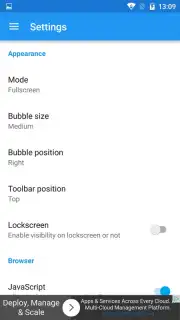
Flyperlink re-engineers the mobile browsing paradigm by decoupling web content from a traditional tab-based interface. Its core mechanic revolves around dynamic link bubbles—persistent, floating windows that encapsulate individual web pages. This is not merely a visual gimmick but a functional overlay system that operates independently of your current application. The primary interface allows for precise customization of these bubbles; users can adjust their on-screen anchor points and scale their size from a discreet thumbnail to a more substantial panel, ensuring the system adapts to both quick reference and engaged reading without obstructing the underlying workspace.
The operational logic is straightforward yet powerful: any hyperlink selected outside the browser can be directed to spawn a new bubble, which immediately begins loading content in the background. The tactile feedback of pressing a bubble to expand it into a full, interactive browser view eliminates the need for app switching. A critical efficiency feature is the background loading queue. The application intelligently manages resource allocation, allowing you to initiate the loading of several links sequentially while continuing your primary task. Completion is signaled visually through the bubble's iconography, which transitions to display the favicon of the fully loaded website, providing clear, non-intrusive status updates.
Further supporting this workflow is a centralized history log within the main application interface. This log meticulously catalogs every link processed through the bubble system, creating a valuable audit trail of research threads or casual browsing. For onboarding, the app includes a concise, feature-focused guide that outlines advanced configurations and gestures, ensuring users can quickly leverage the full suite of tools beyond the basic floating functionality. The absence of advertising interfaces, coupled with a claimed data optimization mode, suggests a design priority aimed at reducing friction and preserving data integrity during these parallel browsing sessions.
Core Feature Breakdown
- Floating Link Bubbles: Transforms web links into persistent, draggable windows that hover over other apps for true parallel browsing.
- Background Load Queue: Initiates and manages website loading in a sequential background process, with visual icon-based completion alerts.
- Centralized History & Guide: Maintains a dedicated log of all bubble activity and provides immediate access to a functional tutorial for advanced features.
Download the Mobile App Now
This method of managing web content represents a significant shift from standard mobile browsing protocols. For users engaged in research, comparative shopping, or social media cross-referencing, the efficiency gain is tangible. Limited operational access to this browsing model is available for initial users today. Implement this layered workflow on your device to experience a de-fragmented mobile internet.
Disclaimer: This application requires an active internet connection for browsing functionality. The developer may offer additional premium features or enhancements via in-app purchases.
Information
| Version | 1.43.RC3 |
| Developer | Flyperinc |
| Requirements | Android Android + 4.0, 4.0.1, 4.0.2+ |
| Updated | 17.03.2026 |
| Size | 3.29 MB |
| Package | com.flyperinc.flyperlink |
| Signature | 349f68c208e8ad0543f9b381cb93b721 |
| Architecture | universal |


