

Format SD card screenshots (1)
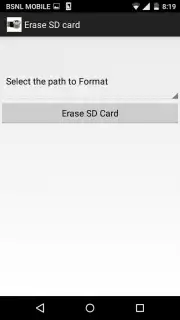
Description Format SD card
A Direct Solution for Reclaiming Your Storage Space
Managing digital clutter on an SD card can render it slow, disorganized, or even unusable. This utility provides a straightforward, no-frills method to completely wipe and reformat your external storage, restoring it to a clean, functional state. It addresses a fundamental maintenance task that is often buried deep within system settings, offering a dedicated and simplified interface for direct control over your storage media.
Core Functionality and User Workflow
The application’s primary function is to format SD cards, but it presents this process through a clear, step-by-step workflow designed to prevent user error. Upon launching, the tool detects available external storage volumes. Users are then guided to select the target SD card, with the interface clearly displaying its current capacity and used space. The critical step involves choosing a file system format—such as FAT32 or exFAT—with brief explanations of compatibility implications for different devices. A final confirmation screen, requiring explicit user input, acts as a safeguard against accidental data deletion before the irreversible format command is executed.
Key Operational Advantages
The utility’s value lies in its focused performance and user-centric design. It eliminates the complexity often associated with system-level storage tools, presenting a single-purpose operation with maximum clarity.
- Streamlined Single-Task Interface: Presents a clean, ad-free environment dedicated solely to the formatting process, removing unnecessary menus and distractions for a focused task completion.
- Explicit Data Deletion Safeguards: Implements multiple confirmation prompts and clear warnings to ensure the user intentionally initiates the permanent erasure of all data on the selected drive.
- Broad File System Compatibility Support: Offers a choice between common formats, providing essential guidance on selecting the correct option for cameras, phones, or other hardware.
We suggest trying this tool if you need a reliable, straightforward method to refresh a full or corrupted SD card, preparing it for new data without navigating complex system menus.
Download mobile app now
Disclaimer: This utility requires an SD card inserted into your device and a stable internet connection for initial download and potential updates. The operation permanently deletes all data on the selected storage medium; ensure you have created backups. The app may require permissions to access storage for functionality. Use in accordance with your device's terms and age restrictions. Data charges may apply.
Information
| Version | 1.23 |
| Developer | shourya yapps |
| Requirements | Android Android + 4.0.3, 4.0.4+ |
| Updated | 17.03.2026 |
| Size | 2.59 MB |
| Package | com.formatsdcard591 |
| Signature | 03641cf43597373c5a19964da0fe3e3c |
| Architecture | universal |


