


GoTube screenshots (9)






Description GoTube
Looking for a video player that unlocks YouTube's full potential without the standard limitations? GoTube delivers a comprehensive viewing experience by integrating enhanced playback controls, background audio functionality, and direct account management, all within a streamlined interface.
Core Functionality and User Experience
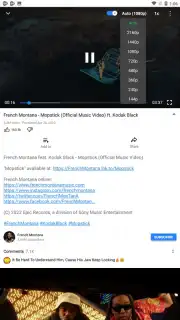
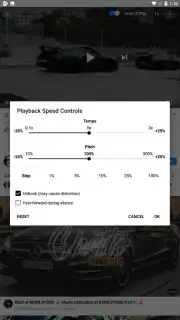
This application operates as a dedicated client for YouTube video playback, providing granular control over the viewing session. Users can manually select streaming resolutions including 240p, 360p, 720p, 1080p, 1440p, and 2160p. Playback speed is adjustable across a wide spectrum from 0.25x to 3.0x normal speed. The player includes a repeat function, a casting option for Chromecast devices, and a tool to automatically skip silent segments in videos. A key operational note is that the app requires the "display over other apps" permission to enable background audio playback when the screen is off or when using other applications. The interface is organized into five primary content discovery sections: Featured, Popular, Music, Games, and Movies.
Advanced Features and Account Integration
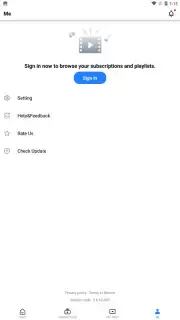
Beyond basic playback, GoTube introduces several system-level enhancements. It offers a forced screen-fit adaptation for videos and provides direct shortcuts to open content in a web browser or the official YouTube app. A significant differentiator is full YouTube account integration, allowing users to log in and manage their personal channel directly through the GoTube interface. This facilitates access to subscribed content and playlists. The application does not contain a native video download function, focusing instead on streaming and playback optimization.
Detailed Feature Overview
The application's capabilities are centered on customization and uninterrupted access.
- Select specific video quality from 240p to 4K (2160p) resolution.
- Adjust playback speed across a 0.25x to 3.0x range with granular control.
- Enable continuous background audio with screen-off functionality.
- Activate forced screen-fit and subtitles for any supported video.
- Log into your YouTube account to manage subscriptions and your channel.
Download the GoTube mobile app now to access this enhanced feature set. This is a limited-time offer for new users to experience ad-free, turbo-charged playback.
Disclaimer: This application requires an active internet connection for streaming. Features and content accessibility are dependent on external service availability. The developer is not affiliated with or endorsed by YouTube. Use of background playback may require specific device permissions.
Information
| Version | 5.5.60.111 |
| Developer | GoTube Studio |
| Requirements | Android Android + 5.0+ |
| Updated | 17.03.2026 |
| Size | 31.91 MB |
| Package | premium.gotube.adblock.utube |
| Signature | 515e4545a1e105f765dab43e3b72b96f |
| Architecture | armeabi-v7a, arm64-v8a |


