


HiOS Launcher screenshots (5)




Description HiOS Launcher
Tired of Your Phone Looking and Feeling Like Everyone Else's?
Does your Android home screen feel generic, cluttered, or just plain boring? The standard interface often locks you into a rigid layout with limited options for true personal expression. HiOS Launcher solves this by transforming your device's entire user experience from the ground up. It's more than just a theme; it's a comprehensive customization platform that hands you complete control over your device's aesthetics, interactions, and functionality. This launcher is engineered for users who view their smartphone as a personal canvas, offering a depth of tools to create a genuinely unique and efficient digital environment that reflects your style and usage habits.
A Deep Dive into HiOS Launcher's Customization Engine
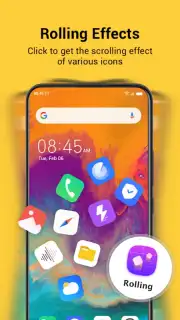
HiOS Launcher provides a systematic approach to personalization, beginning with a clean, pre-configured setup that ensures immediate usability. The real power, however, lies in the granular control you gain over every visual and interactive element. The launcher's core architecture allows for effortless reorganization: tap and hold any app icon or widget to enter edit mode, where you can drag to reposition, cluster apps into custom folders, or resize elements directly on the home screen. Beyond static layout, the app features a dedicated transition effects engine. This system intelligently integrates screen animations, enabling you to assign specific visual effects—such as fluid fades, 3D rotations, or particle dissolves—that trigger when swiping between home screen panels or opening and closing applications.
The feature set extends deeply into utility and discovery. An integrated, always-on music recognition system listens via your microphone and displays the title and artist of any playing song in real-time, directly on your notification panel or as a widget. For content discovery, HiOS includes a dedicated gaming portal tab that aggregates new and popular mobile game titles, providing daily recommendations and direct install links. Furthermore, the launcher offers extensive notification customization, allowing you to apply unique visual styles, icons, and alert sounds for different apps. The advertised Turbo mode is a significant component, designed to enhance performance by optimizing system resources and, according to the developer, removing advertisement placements from within the launcher's interface for a cleaner experience.
- Complete home screen layout control
- Intelligent music recognition widget
- Dedicated game discovery portal
- Advanced transition effects engine
- Deep notification customization
- Performance-focused Turbo mode
We suggest trying HiOS Launcher if you are ready to move beyond simple wallpaper changes and explore a professional-grade toolkit for reshaping how you interact with your Android device daily. Consider downloading it to unlock a level of personalization that makes your phone feel truly bespoke.
Internet required. IAP available.
Information
| Version | 15.5.3.039 |
| Developer | Shalltry Group |
| Requirements | Android Android + 15+ |
| Updated | 17.03.2026 |
| Size | 33.6 MB |
| Package | com.transsion.hilauncher |
| Signature | ab6f5db95c030d50e488443bf413da94 |
| Architecture | arm64-v8a |


