

hovernote screenshots (4)

Description hovernote
Never Lose a Thought Again: Your Floating Notebook for Android
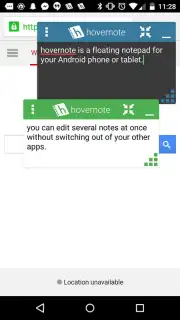
Imagine you're deep in a research rabbit hole online, and a crucial idea flashes through your mind. Or you're messaging a friend and suddenly remember an urgent errand. The old way means stopping everything, fumbling for a notes app, and losing your flow. That frustrating interruption ends now. Hovernote transforms your Android into a true multitasking powerhouse by placing a persistent, floating notebook directly over any other app. Your thoughts are captured instantly, without ever switching screens or breaking your concentration. This isn't just another note-taking app; it's a seamless layer of productivity that lives on top of your digital world, ensuring no spark of inspiration ever fades away.
A New Dimension of Digital Note-Taking
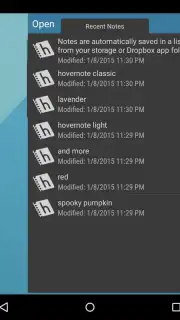
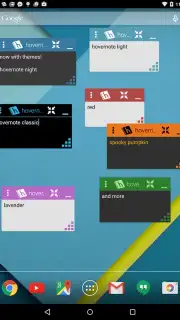
Hovernote redefines convenience by making your notes omnipresent. You experience a fluid workflow where your notes are always a tap away, whether you're browsing PDFs, checking social media, or watching a video. The core magic is in the floating window—a fully functional text editor that you can resize, move, and make semi-transparent, so it never fully obstructs your view. Every note auto-saves securely as a .txt file on your device, guaranteeing your ideas are preserved. But the customization goes far deeper. You can dress up each individual note with its own color theme or apply a unified aesthetic across all your floating windows, creating a visual environment that suits your mood and enhances focus.
The true power unfolds with its advanced integration. You're not just creating isolated notes; you're building a connected knowledge system. With seamless sharing to cloud services like Dropbox or Evernote, your floating thoughts can instantly become part of your larger projects. For the ultimate in hands-free efficiency, Hovernote connects directly with Android Wear. Picture this: you're on a walk, an idea strikes, and you simply raise your wrist and dictate a note into your smartwatch. It appears instantly in your floating notebook, ready for when you get back to your phone. This app thinks about productivity from every angle.
Why Your Workflow Needs Hovernote
- True App-Over-App Multitasking: Keep a note, list, or reminder visibly floating over your game, browser, or messaging app. No more frantic app-switching; your notes are always in context.
- Open Multiple Notes Simultaneously: Juggling several tasks or projects? Launch multiple independent Hovernote windows. Compare information, draft different sections, or keep separate lists all visible at once.
- Deep Visual Customization: Personalize everything. Choose custom themes per note, adjust window transparency for the perfect see-through effect, and modify font styles and sizes for optimal readability.
- Robust Editing & Management: A dedicated editing toolbar makes selecting, cutting, copying, and pasting text a breeze directly within the floating window. It’s a full editor, not just a simple text field.
- Smart Persistence & Alerts: Configure notifications to stay active even after you close a note, perfect for persistent reminders. Set your preferred auto-save intervals for complete peace of mind.
- Wear OS by Google Integration: Create new notes directly from your compatible smartwatch using voice input or a compact keyboard, capturing ideas the moment they happen, anywhere.
- Universal File Support & Sharing: Easily open, edit, and save standard .txt files from your device’s storage. Export or sync notes effortlessly to major cloud platforms for universal access.
- Turbo Experience: Enjoy a streamlined, ad-free interface that prioritizes your focus and productivity without distractions or interruptions.
Consider downloading Hovernote today if you're tired of losing ideas to clumsy app switching. This is the tool that finally bridges the gap between thought and action on your Android device. You might enjoy how it turns every screen into a productive canvas, keeping your mind clear and your tasks organized without ever leaving the app you're in.
Download the Hovernote mobile app now and start floating your ideas.
*Please note: This app requires an internet connection for cloud integration features and may contain in-app purchases for additional premium functionalities.
Information
| Version | 3.1 |
| Developer | mjlim (Mike Lim) |
| Requirements | Android Android + 10.9 Mavericks+ |
| Updated | 17.03.2026 |
| Size | 4.91 MB |
| Package | com.mjlim.hovernote |
| Signature | 2ab7c98d2e426de4fdf8a7bb558cebdd |
| Architecture | armeabi, mips, x86 |


