

Huawei File Manager screenshots (2)
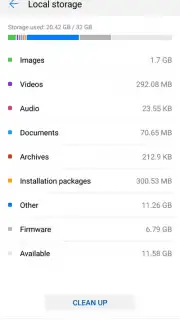
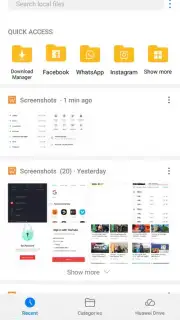
Description Huawei File Manager
Your Phone's Hidden Chaos, Finally Organized
Imagine opening a drawer in your phone and instantly finding exactly what you need. No more endless scrolling through cryptic folders or digging for that one downloaded document. That’s the immediate clarity Huawei File Manager delivers. This isn't just another utility; it's the official, built-for-purpose command center that puts you back in total control of your digital space, transforming storage management from a chore into a seamless part of your day.
Experience Effortless Mastery Over Every File
From the moment you open the app, you’re greeted by an interface designed for speed and understanding. Everything stored on your device—photos, videos, downloads, logs, and documents—is presented with a clean, visual layout. You navigate not through a maze, but through intuitively categorized icons that make any search lightning-fast. Feel the satisfaction of moving files between folders, renaming batches in a tap, or locating a crucial log file without ever needing a confusing third-party tool. The app seamlessly bridges your phone's internal storage and any external memory cards, giving you a unified, powerful view of your entire digital library.
A standout feature is the deep integration with Huawei Drive. With a single tap, you can offload entire folders to secure cloud storage. This smart integration means you can preserve precious photos and important documents without letting them clog your device's memory, freeing up space for new apps and media while keeping everything accessible. The entire experience is turbocharged for performance, ensuring operations like searching, moving, or compressing files happen without lag. And you enjoy this powerful toolkit completely free from intrusive ads, allowing you to focus purely on productivity.
Why Your Phone Needs This Manager
- Official & Optimized: Built by Huawei specifically for your device, ensuring flawless compatibility, superior stability, and direct access to all system files without compromises.
- Turbo-Fast Navigation: An intelligent categorization system with clear icons gets you to your files instantly, whether you're browsing recent downloads, images, audio, or documents.
- Unified Storage View: Effortlessly manage and transfer files between your phone's internal memory and external SD cards from one simple, consolidated interface.
- Smart Cloud Integration: Direct one-tap access to Huawei Drive for automatic backups and intelligent storage management, keeping your phone running smoothly.
- Zero-Ad Clutter: Enjoy a completely clean, focused, and interruption-free experience designed purely for efficient file management.
- Advanced File Operations: Perform complex tasks with ease, including detailed sorting, batch selections, compression, and extraction, all with a polished, user-friendly design.
Consider downloading Huawei File Manager now to unlock a new level of order and efficiency on your device. It’s the definitive tool to declutter your digital life and master your content.
Download the Huawei File Manager mobile app now.
Note: Certain cloud features require an internet connection. This app is free to download and use; additional cloud storage services may involve separate subscriptions.
Information
| Version | 15.7.0.600 |
| Developer | Huawei |
| Requirements | Android Android + 10+ |
| Updated | 17.03.2026 |
| Size | 42.16 MB |
| Package | com.huawei.hidisk |
| Signature | bb7bce1b1090fc3a6b67ebc88701acdd,9dc2f47e241ab912e5c35fa9287f25a2 |
| Architecture | armeabi, arm64-v8a |


