

Iconify screenshots (3)
Description Iconify
Unlock Android Customization Beyond the Limits
Tired of staring at the same generic interface on your phone, wishing you could tweak the system icons or adjust the spacing that manufacturers lock down? You’re not alone. For Android enthusiasts who crave deep personalization, standard launchers and themes only scratch the surface. This is where a powerful tool steps in, designed for those who want to reclaim visual control over their device’s operating system. It requires a specific setup, but the payoff is a level of customization typically reserved for custom ROM developers.
Dive Into a World of Pixel-Perfect Personalization
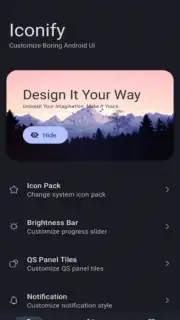
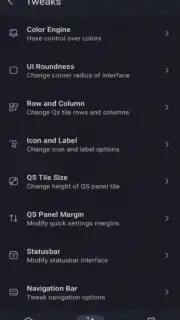
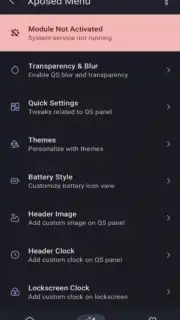
Once you meet the prerequisites, you enter a detailed dashboard where almost every visual element of your Android interface becomes a variable. The array of settings is comprehensive, moving far beyond simple icon packs. You gain the ability to reshape the fundamental geometry and palette of your system UI. This includes modifying the grid layout for your app drawer and home screen, altering the corner radius for all system windows and notifications, and fine-tuning the status bar’s information density and style. The application provides precise control over dynamic elements like the brightness and volume sliders, allowing you to change their thickness, color, and behavior.
The core experience revolves around systemic visual overhaul. You can replace every application icon on your device, including those for system apps like Settings or the Phone dialer, with a consistent style of your choice. Color customization extends to backgrounds, accents, and text across menus and quick settings panels. The tool operates by creating a dynamic module that integrates with your system, applying these changes at a framework level to ensure they persist across all applications and system menus. The interface, while powerful, is structured to be navigable, grouping related tweaks together to prevent feeling overwhelmed.
- Root-Level System Icon Replacement
- Complete UI Geometry & Grid Control
- Dynamic Slider & Status Bar Customization
- System-Wide Color & Theme Engine
Transform Your Device’s Personality
This is for the user who views their Android device as a blank canvas. The process transforms your phone or tablet from a mass-produced product into a uniquely personalized tool that reflects your specific taste. The modifications apply cohesively, creating a harmonious and tailored visual experience that feels built for you. While the initial setup involves technical steps, the ongoing use is straightforward, with changes previewed and applied through a reboot. The project is supported by detailed documentation and community resources to guide you through its capabilities.
Start crafting an Android interface that is truly yours. Download the app now and begin your customization journey.
Heads up: This app requires a rooted Android device (Android 12+) with a framework like LSPosed installed. You’ll need a Wi-Fi connection for initial setup and access to resources. Full functionality depends on your specific device and root method.
Information
| Version | 7.2.0 |
| Developer | DrDisagree |
| Requirements | Android Android + 12+ |
| Updated | 17.03.2026 |
| Size | 39.43 MB |
| Package | com.drdisagree.iconify |
| Signature | 9a8ea334d27429ca9518206e7318d3b0 |
| Architecture | armeabi-v7a, x86, arm64-v8a, x86_64 |


