

iLock Screen screenshots (6)
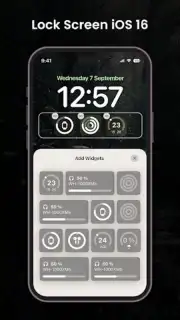
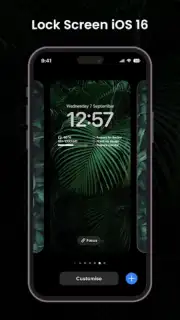
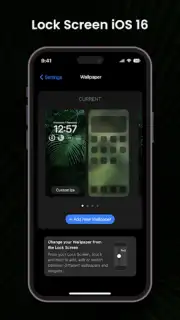
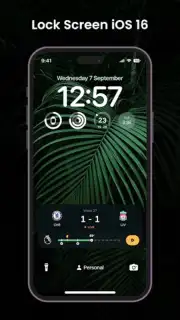
Description iLock Screen
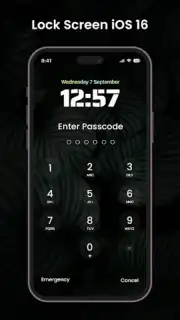
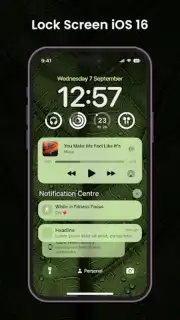
Imagine unlocking your Android phone and being greeted not by its familiar interface, but by the clean, sophisticated aesthetic of an iPhone lock screen. This is the precise experience engineered by iLock Screen from Fronex Lab. It’s more than a simple theme; it’s a functional port that meticulously replicates the visual language and interactive mechanics of iOS’s lock screen, offering a seamless bridge between Android’s flexibility and Apple’s renowned design ethos. The app operates as a dedicated overlay, transforming your device's first point of contact into an exercise in minimalist elegance without requiring root access or complex modifications.
Core Functionality and Design Philosophy
The application’s primary achievement is its faithful recreation of the iPhone lock screen’s core behaviors. Upon activation, it introduces the signature slide-to-unlock gesture, providing a tactile and visually distinct method of accessing your home screen. Security is integrated through a passcode lock feature that activates over your system security, adding a familiar layer of protection. Crucially, the app manages to display real-time notifications directly on this lock screen interface. This allows you to preview messages, emails, and alerts at a glance, merging immediate functionality with the app’s central aesthetic mission. The design is not a static skin but an interactive layer that prioritizes a fluid, jitter-free animation experience, ensuring the visual mimicry is matched by operational smoothness.
Deep Customization and Utility Features
Where iLock Screen diverges from mere imitation and establishes its own value is in its extensive personalization suite. The app provides a curated, high-resolution wallpaper gallery with imagery tailored to complement the clean iOS-style widgets and fonts. Alternatively, it grants you the ability to set any personal photograph as the background, effectively framing your memories within this elegant interface. Beyond aesthetics, utility widgets are thoughtfully incorporated. A stylish, customizable clock and a live weather widget are positioned for optimal readability, delivering essential information without requiring an unlock. Furthermore, a dedicated night mode automatically shifts the entire lock screen to a darker color palette, reducing eye strain in low-light conditions and conserving battery life on OLED displays.
Performance and User Experience Considerations
Developed to be lightweight, iLock Screen is engineered to have a negligible impact on system resources and battery longevity. It runs as an efficient service, avoiding the lag or drain commonly associated with heavy customization apps. The developers emphasize an ad-free experience, particularly for users who activate the optional Turbo mode, which is designed to streamline processes and potentially enhance responsiveness. The app successfully unites practicality with polished design, effectively transforming your Android device’s lock screen into a more elegant, informative, and personalized gateway.
- Authentic iOS Interface: Faithfully replicates the iPhone lock screen with slide-to-unlock, passcode security, and real-time notification display for a seamless cross-platform experience.
- Advanced Personalization Engine: Offers a library of premium wallpapers and full support for personal photos, alongside customizable clock faces and an integrated live weather widget.
- Optimized Performance Profile: Functions as a lightweight, battery-efficient overlay with a dedicated night mode and an optional Turbo mode for an enhanced, advertisement-free user experience.
We suggest trying iLock Screen if you appreciate minimalist design and seek to add a layer of sophisticated, functional customization to your Android device. Consider downloading it to experience a uniquely polished lock screen interface.
Download the iLock Screen mobile app now.
Disclaimer: This application requires an internet connection for initial setup, weather data, and potential updates. It functions as a lock screen overlay and requires corresponding accessibility permissions to operate. The app may contain optional in-app purchases for advanced features or themes. Use of personal photos for wallpaper is subject to your device's storage permissions. Please be aware that while the app enhances lock screen aesthetics and functionality, it operates alongside your device's native security system. Data usage depends on wallpaper downloads and widget updates. Suitable for all ages, but device administration permissions are required for full functionality.
Information
| Version | 1.0 |
| Developer | Fronex Lab |
| Requirements | Android Android + 5.0+ |
| Updated | 17.03.2026 |
| Size | 10.7 MB |
| Package | com.iphonelockscreen.ioslockscreen.istyle |
| Signature | 357fd1dda73fb20994b0a390f06a1ad6 |
| Architecture | universal |


