

iOS Launcher: iPhone 15 Pro screenshots (5)
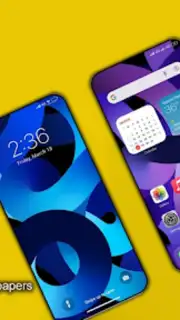
Description iOS Launcher: iPhone 15 Pro
Transform Your Android Interface with iOS Precision
For Android users seeking the polished aesthetics and streamlined interaction model of Apple's ecosystem, replicating that experience has often required complex modifications or compromised performance. This application provides a systematic software layer that re-skins the Android operating system to visually and functionally mimic the iOS environment, specifically modeled on the iPhone 15 Pro. It addresses the desire for a cohesive, minimalist design language without requiring root access, delivering a familiar iOS-style home screen, control center, and app library directly on Android hardware.
Core Functionality and System Integration
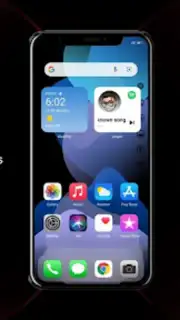
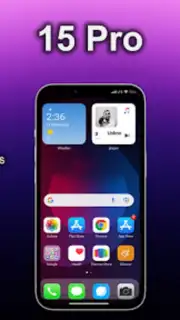
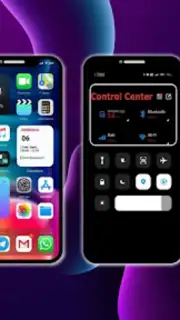
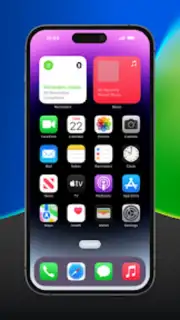
The launcher operates by replacing your default Android home screen with a pixel-accurate simulation of iOS. The primary mechanics involve a full suite of customizable widgets, an app drawer that sorts applications into an iOS-style list and folder system, and a dynamic interactive control center accessible with a swipe. Key tools include a theme engine that applies consistent icon packs to both native and third-party apps, gesture navigation tuned to feel like iOS swipes, and a notification shade that mirrors the iOS layout. The system is designed for deep integration, allowing users to set default iOS-style animations for opening and closing apps, and includes simulated system apps like a facsimile of the iOS Settings menu for launcher configuration.
Key Advantages and User Experience
The principal strength of this tool is its high-fidelity visual replication, which extends to system sounds, wallpaper curation, and icon glyphs. Performance is maintained through lightweight code that doesn't heavily tax system resources, ensuring smooth transitions and reliable operation on devices running Android 7.0 and above. The user experience is defined by its convenience; the setup process is guided, and daily use offers a consistently organized interface that reduces visual clutter. The customization balance is notable—it provides enough depth to feel authentic while preventing settings from becoming overwhelmingly technical for the average user.
- Implement a fully customizable iOS 16 / 17 style lock screen with widgets.
- Access a slide-down Control Center for quick settings and device controls.
- Utilize an App Library for automatic categorization of all installed applications.
- Apply uniform icon themes to create a visually cohesive home screen grid.
- Navigate using fluid gesture controls that mimic iOS system interactions.
Start transforming your Android device into a seamless iOS experience today.
Download mobile app now
Requires a stable internet connection for initial setup and asset downloads. The application may offer optional in-app purchases for premium themes and advanced customization features.
Information
| Version | 4.7 |
| Developer | Volunteerx 360 |
| Requirements | Android Android + 7.0+ |
| Updated | 17.03.2026 |
| Size | 8.41 MB |
| Package | com.volunteerx360.iphone2020.iphone12pro2020.freethemesiphone.freewallpaperiphone12.iphonelauncher2020.iphonetheme.ioswallpaper.iphoneicon.themespro |
| Signature | 517fe7250e5ada883e17f9c885de3f78 |
| Architecture | armeabi-v7a, x86, arm64-v8a, x86_64 |


