

Keyboard for Samsung screenshots (3)


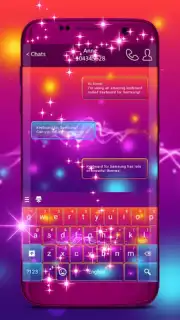
Description Keyboard for Samsung
The Default Keyboard Is a Compromise, Not a Choice
Your Samsung device is powerful, personalized, and uniquely yours—until you need to type. The standard keyboard often feels like a generic tool, lacking the visual flair and tactile customization that matches your style. This creates a disconnect between your device's potential and your daily interaction with it, turning every message and search into a reminder of a missed opportunity for personal expression.
A Tailored Typing Experience Engineered for Samsung
Keyboard for Samsung operates as a dedicated theme and utility engine for your device's native input system. It does not replace your core Samsung keyboard but seamlessly enhances it with a comprehensive library of visual and functional modifications. The primary mechanics involve applying curated theme packs that transform every visual element—from key shapes and backgrounds to press animations and font styles. The app provides a centralized hub for browsing, previewing, and installing these themes, which are specifically optimized for Samsung's display ratios and system behaviors. A typical session involves selecting a theme from categories like Modern Minimal, Neon Glow, or Nature Inspired, viewing a detailed preview of the keyboard layout in both light and dark modes, and applying it with a single tap. The change is system-level, meaning the new design appears instantly across all applications, from messaging and social media to web browsers and note-taking apps.
Key Advantages of This Customization Tool
The principal strength of this application lies in its focused compatibility and risk-free customization. By working in harmony with the pre-installed Samsung keyboard framework, it ensures stability and preserves all the original functionality, including SwiftKey-powered predictions and language support, while solely altering the aesthetics. The theme library is curated for quality, with each design undergoing checks for visual clarity, contrast for readability, and graphical optimization to prevent battery drain or input lag. The user experience is streamlined for immediacy; there is no complex setup, no permission overhauls, and no need to switch between different keyboard apps. The visual transformation is comprehensive, affecting not just the keys but also the pop-up characters, spacebar accent, and even the cursor trail, creating a cohesive and immersive typing environment that feels like a native feature rather than a third-party add-on.
- Vast library of HD keyboard themes
- One-tap application, no complex setup
- Preserves all original keyboard functions
- Optimized specifically for Samsung devices
Don't settle for the stock look any longer. Transform the most-used interface on your phone into a reflection of your personal style today.
Download Keyboard for Samsung now and apply your first theme in under a minute!
Requires an internet connection for browsing and downloading theme packs. The app may contain offers for additional premium theme collections.
Information
| Version | 3.156.60.73 |
| Developer | T-Me Themes Center |
| Requirements | Android Android + 3.0.x+ |
| Updated | 17.03.2026 |
| Size | 3.26 MB |
| Package | com.jb.gokeyboard.theme.tmekeyboardforsamsung |
| Signature | b2aa34b242cd91953b6ce3110d21a121 |


