


LiveBoot screenshots (6)
Description LiveBoot
A Glimpse Beneath the Boot Screen
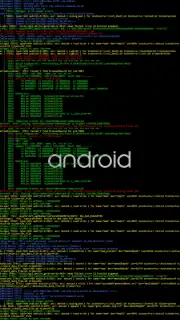
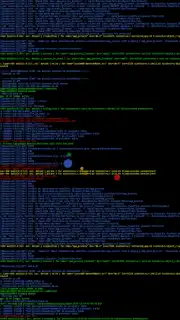
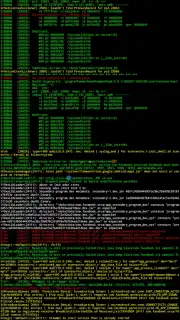
For most users, the Android boot sequence is a simple, static logo—a brief moment of waiting before the familiar home screen appears. For the technically curious, however, that black screen represents a hidden world of activity where the system initializes services, loads drivers, and logs every step of the process. LiveBoot, developed by the renowned Chainfire, transforms this opaque startup into a dynamic, informative display. It replaces the standard boot animation with a real-time, scrolling terminal output, pulling directly from the system's logcat and dmesg logs. This isn't merely a cosmetic tweak; it's a diagnostic window into the very heart of your device's boot process, offering unparalleled visibility for developers, modders, and power users who need to understand what happens before the UI loads.
Core Functionality and Granular Configuration
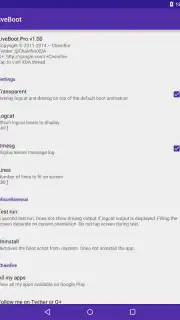
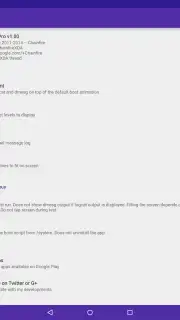
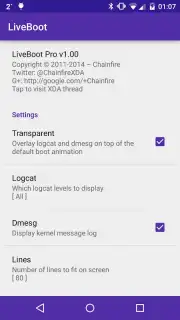
At its essence, LiveBoot serves as a visual boot logger. The application mounts early in the boot sequence, after the data partition is accessible, and begins streaming system log data directly to your screen. The level of control over this display is extensive. You can configure which logcat buffer to read—such as main, system, or events—and set the verbosity level from verbose to fatal, filtering out the noise to see only the critical messages. The dmesg kernel ring buffer output can be toggled on or off independently. Visual customization is equally detailed: you define the exact number of text lines displayed during boot, enable or disable word wrap for cleaner formatting, and apply color-coding to the output. This colorization is key for readability, allowing you to quickly distinguish between error messages (often in red or white), warnings, and standard informational logs. An optional transparent overlay can be applied, letting the default boot animation faintly show through behind the scrolling text, which combines aesthetic appeal with functionality.
Testing, Requirements, and Operational Nuances
A standout feature is the integrated test mode, which allows you to preview your LiveBoot configuration without performing a full device reboot. This is invaluable for fine-tuning colors, line count, and buffers. It's important to note that the test output is generated from current system logs and may be limited or static compared to the dynamic, sequential flood of messages during an actual cold boot. The fundamental requirement for LiveBoot is a rooted device with either SuperSU version 2.40+ or the latest Magisk installed. The app operates at a system level, requiring these permissions to intercept the boot process. Its behavior is also tied to your device's encryption state; if your device requires a decryption password or pattern at boot, the LiveBoot animation will only begin after that security step is successfully completed. Compatibility is officially stated for Android 5.0 (Lollipop) and newer, but results can vary significantly across different OEM skins, custom ROMs, and firmware versions. While the risk of a bootloop is generally low, firmware updates can sometimes disrupt functionality. Recovery is straightforward: the APK or its system files can be removed via a custom recovery mode if necessary.
Advanced Capabilities: Pro Mode and Custom Scripts
Unlocking the Pro version of LiveBoot, either via in-app purchase or through ownership of legacy paid versions, grants access to a deeper tier of customization. This includes enhanced transparency controls for the overlay and more granular logcat filtering options. The most powerful Pro feature, however, is the custom script functionality. This allows you to bypass the standard log capture entirely and execute your own shell scripts during the boot sequence. The output from these custom scripts is displayed on the boot screen in distinct white and red coloring, separating it clearly from the standard system log output. This enables advanced users to run diagnostic checks, initialize specific system parameters, or simply display custom information directly on the boot screen, turning it into a highly personalized status dashboard.
- Real-time boot log visualization
- Extensive logcat and dmesg controls
- Fully customizable text display
- Pro features for advanced users
Start diagnosing your boot process and unlock a new level of device insight today. Download the LiveBoot app now and transform your startup screen into a powerful diagnostic tool.
Heads up: you'll need wifi for most features. Some cool stuff is extra. This app requires a rooted device (SuperSU 2.40+ or Magisk) and may have variable compatibility with custom ROMs. A bootloop risk, though small, exists.
Information
| Version | 1.92 |
| Developer | Chainfire |
| Requirements | Android Android + 5.0+ |
| Updated | 17.03.2026 |
| Size | 633.57 KB |
| Package | eu.chainfire.liveboot |
| Signature | 61956112b0e971576383f8592bce549c |
| Architecture | armeabi-v7a, x86, arm64-v8a, x86_64 |


