

Mailbox screenshots (4)

Description Mailbox
A Gesture-Driven Approach to Email Management
Mailbox by Dropbox represents a significant shift in mobile email client design, moving away from button-heavy interfaces toward a fluid, gesture-based system. This application redefines inbox management by treating email as a stream of actionable items that can be processed with intuitive swipes, significantly reducing the time spent on routine message handling. Its core philosophy centers on achieving "Inbox Zero" not through complex filtering alone, but through tactile, immediate actions that make clearing a crowded inbox feel less like a chore and more like a streamlined workflow.
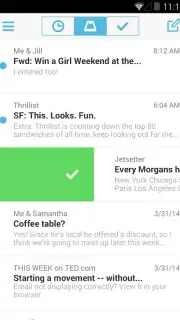
The interface is deliberately minimalistic, removing visual clutter to focus attention solely on the content of your messages. This design choice is not merely aesthetic; it directly facilitates the primary gesture controls. A short swipe to the right archives a message, a long swipe completely deletes it, and a swipe to the left offers options to snooze an email to a later date or move it to a specific folder. For users accustomed to traditional clients like Gmail, the initial experience may feel sparse, but the efficiency gained through muscle memory is substantial. The absence of display advertising, a notable feature in itself, ensures an uninterrupted workflow, allowing for complete focus on task completion.
Core Functionality and User Experience
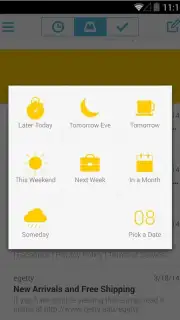
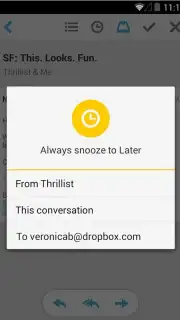
Beyond the foundational gestures, Mailbox integrates seamlessly with major email providers, offering robust support for multiple accounts within its clean framework. The "Snooze" function is particularly powerful, allowing you to temporarily remove emails from your inbox and have them return at a specified time—such as later today, tomorrow, or next week—effectively turning your inbox into a timed to-do list. Performance is optimized for speed, with background syncing that ensures your view is always current without manual refreshes.
- Swipe-Based Command System: Execute archive, delete, and snooze actions directly from your inbox list with customizable gesture controls for rapid processing.
- Focused, Ad-Free Interface: A clean visual layout eliminates distractions and advertising, promoting sustained concentration on email triage and response.
- Intelligent Message Snoozing: Temporarily remove emails from your active view and schedule their return for when you are ready to address them, creating a deferred inbox.
This application is engineered for users who view their inbox as a queue to be processed, not a archive to be perpetually stored. It transforms email management from a passive reading activity into an active, decision-oriented process.
Get your bonus of a clutter-free inbox and start processing email with unprecedented speed today. Download the mobile app now to claim your advantage.
Internet required. IAP available.
Information
| Version | 2.1.0 |
| Developer | Dropbox |
| Requirements | Android Android + 2.2.x+ |
| Updated | 17.03.2026 |
| Size | 20.73 MB |
| Package | com.mailboxapp |
| Signature | 87a9100df0ecae845237b75158592451 |
| Architecture | armeabi-v7a, x86 |


