

MailDroid screenshots (4)
Description MailDroid
MailDroid Delivers a Streamlined, Ad-Free Email Experience for Android
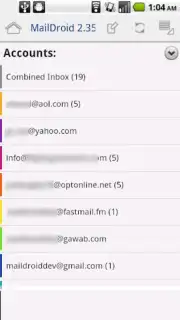
MailDroid by Flipdog Solutions provides a focused and efficient email client for Android, designed around core functionality rather than feature overload. It establishes a clean environment for managing multiple accounts, sending and receiving messages, and handling basic text formatting without unnecessary complexity. This approach results in a lightweight application that prioritizes reliable daily use over advanced integrations or automated workflows found in some competitors.
The application's interface is structured for straightforward navigation, allowing quick access to different inboxes and message composition. A key operational feature is the complete absence of advertising, which is sustained through an optional Turbo upgrade. This model ensures the base application remains unobtrusive. While it may lack certain advanced organizational tools like smart sorting or deep third-party app integrations, MailDroid compensates with stability and a reduced learning curve, making it suitable for users who require a no-fuss mail handler.
Core Functional Analysis
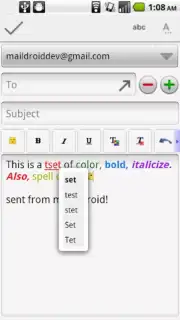
The client supports standard POP3, IMAP, and Exchange protocols for account setup, facilitating the consolidation of emails from various providers into a single dashboard. The text editor within the compose window includes essential formatting options such as font styling, bullet points, and text alignment to structure outgoing communications.
- Unified Multi-Account Management: Securely configure and seamlessly switch between numerous personal and professional email accounts from different providers within one application.
- Enhanced Composer with Text Editing: Draft messages using a built-in editor that provides fundamental formatting tools for creating structured and clear email correspondence.
- Turbo Upgrade for Advanced Features: An optional in-app purchase removes all advertising and unlocks additional capabilities like push notifications for all account types and increased cloud storage support.
We suggest trying MailDroid if your primary need is a stable, advertisement-free environment for managing essential email tasks without extraneous features. Consider downloading the application to evaluate its streamlined approach to daily communication.
Disclaimer: This application requires an active internet connection for full functionality. It offers optional in-app purchases (Turbo upgrade) to remove ads and access premium features. Data usage depends on email volume and sync settings. The app may request permissions to access your email accounts and device storage for attachments.
Information
| Version | 5.22 |
| Developer | Flipdog Solutions |
| Requirements | Android Android + 4.4+ |
| Updated | 17.03.2026 |
| Size | 14.18 MB |
| Package | com.maildroid |
| Signature | 8165be420c6ebfcde7ed0f4ab4ef6df7 |
| Architecture | armeabi-v7a, x86, arm64-v8a, x86_64 |


