

MEO Remote screenshots (4)
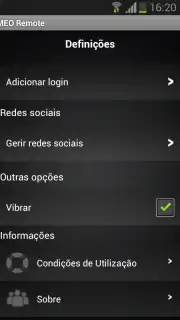
Description MEO Remote
Looking for a way to modernize your TV control and eliminate the common frustrations of a traditional remote? The MEO Remote app transforms your smartphone into a sophisticated, multi-functional control hub for your MEO set-top box, fundamentally altering the user interface with your television.
This application establishes a connection via your MEO WiFi network, creating a seamless link between your mobile device and your television service. The core functionality replaces the physical remote, addressing its primary limitations: the necessity for a direct line of sight is removed, the issue of a lost remote is solved as your phone is always at hand, and dependency on disposable batteries is eliminated. The interface is designed for intuitive navigation, moving beyond simple button replication to offer a consolidated digital control panel.
Core Functionality and Feature Analysis
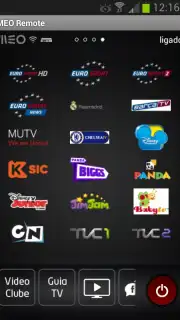
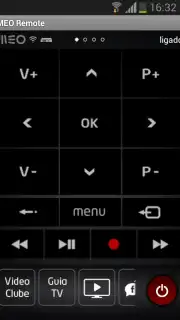
The app is structured into several distinct modes, each serving a specific control or discovery purpose. The 'On TV' function provides detailed metadata for the currently broadcasting program. Channel switching is facilitated through a categorized guide, organized by theme and program type, allowing for browsing without interrupting live viewing. The 'Control' section is a fully digital remote interface, offering precise command over volume, channel input, and menu navigation.
Content discovery is significantly enhanced. The 'Search' utility leverages your smartphone's keyboard for rapid text entry, applying resource filters to narrow results and providing quick access to live sports events. The 'Explore' tab is dedicated to navigating your automatic recordings and curated suggestions from the Video Club. A notable utility is the 'Share Photos' feature, which enables you to display images from your phone's gallery directly on the television screen. Furthermore, integrated voice commands allow for operational control—such as changing channels, adjusting volume, searching for content, launching apps, and tuning the radio—through verbal instructions.
Key Feature Overview
- Comprehensive 'On TV' program details
- Themed, browsable channel guide
- Full digital remote control panel
- Explore recordings and recommendations
- Smartphone-keyboard content search
- Share photos to your TV screen
- Voice commands for key functions
- Exclusive for MEO ADSL/Fiber clients
Developed exclusively for MEO subscribers with ADSL or Fiber packages, this tool consolidates entertainment management into a single, always-available device. It is designed to streamline interaction and provide deeper access to service features directly from your smartphone.
Download the MEO Remote app now and immediately upgrade your television control experience!
Heads up: you'll need an active MEO subscription and WiFi for all features. Some cool stuff, like certain Video Club content, may require an additional subscription.
Information
| Version | 4.4.0 |
| Developer | MEO. |
| Requirements | Android Android + 5.0+ |
| Updated | 17.03.2026 |
| Size | 15.18 MB |
| Package | pt.ptinovacao.iad.meoremote |
| Signature | ed87a64fc0a561cddcb308a428bd0da5 |
| Architecture | armeabi, armeabi-v7a, x86, arm64-v8a, x86_64 |


