


Metro Launcher 10 screenshots (7)
Description Metro Launcher 10
Transform Your Android into a Windows 10 Powerhouse
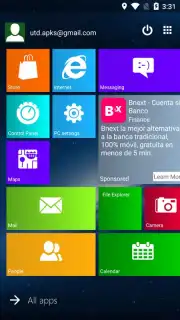
Tired of the same old Android home screen? Metro Launcher 10 seamlessly ports the distinctive, tile-based aesthetic and functional layout of Windows 10 directly to your Android device. This isn't just a superficial skin; it's a comprehensive launcher that rebuilds your interface from the ground up, offering deep customization to create a uniquely efficient and visually striking desktop environment. You gain precise control over every visual element, enabling a personalized workflow that blends familiarity with powerful mobile customization.
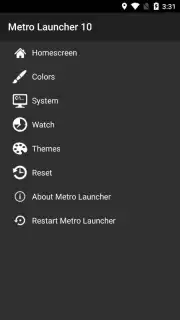
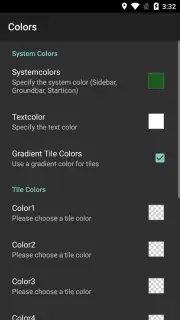
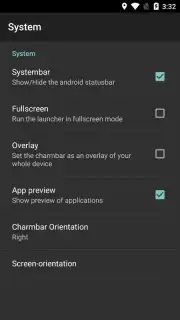
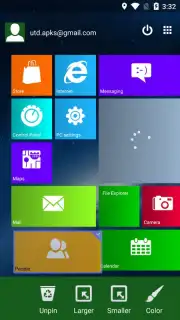
The launcher provides an extensive suite of configuration tools within a dedicated settings menu, allowing you to fine-tune your experience. You can adjust font colors, define the number of columns and rows for your Start menu, and modify the position, size, and accent color of each individual live tile. While the app installs with a curated set of icons and a default user profile avatar in the top-right corner to authentically mimic Windows 10, every single element is fully customizable to your preference.
A significant advantage is the complete absence of banner or pop-up advertisements, especially for users of the Turbo-enhanced version. It's important to note the operational model: the free version grants full access to all settings and customization features, but any changes you make will revert to the default launcher settings after a 15-minute session. This serves as a full-featured trial, allowing you to thoroughly test the launcher's capabilities before deciding to unlock its persistent functionality.
-
- Fully Customizable Live Tiles: Resize, recolor, and reposition interactive widgets and app shortcuts that dynamically display information, just like on a desktop.
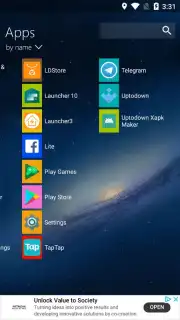
- Granular Layout Control: Precisely set the number of icon columns, adjust grid spacing, and modify font styles across the entire interface for perfect alignment.
- Authentic Windows 10 Experience: Features a default Start menu layout, app drawer icon set, and user profile corner placement designed to closely mirror the PC OS environment.
We suggest trying Metro Launcher 10 to experience a uniquely organized and visually distinct Android home screen that prioritizes information at a glance and systematic control.
Download Metro Launcher 10 now
Disclaimer: This application requires an internet connection for initial setup and potential updates. The free version operates in a 15-minute trial mode. A full, persistent unlock may require a purchase (in-app purchase). Please be aware of data usage policies. The product is intended for a general audience but involves system-level customization.
Information
| Version | 3.0.0.868 |
| Developer | Mobile Software Solutions Knol |
| Requirements | Android Android + 5.0+ |
| Updated | 17.03.2026 |
| Size | 16.43 MB |
| Package | com.mss.metro10.launcher |
| Signature | e21823a7c800c461eeb01da2c09312ff |
| Architecture | armeabi-v7a, x86, arm64-v8a, x86_64 |


