


OPPO Clone Phone screenshots (3)
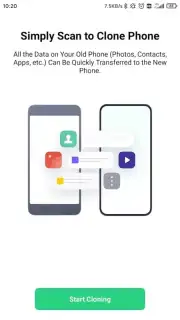
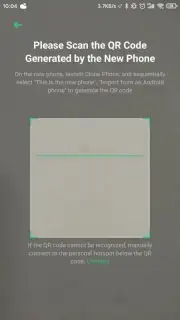
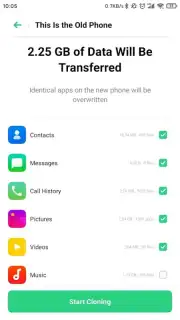
Description OPPO Clone Phone
Your Old Phone's Life, Instantly Reborn on Your New OPPO
Switching to a new OPPO phone should feel like an exciting upgrade, not a tedious chore of manually moving your digital life. The daunting task of transferring years of photos, crucial conversations, and personalized settings can stall your excitement. OPPO Clone Phone erases that friction entirely. This is the official, dedicated tool designed for one seamless mission: to perfectly mirror your old Android device onto your new OPPO, making it feel like home from the very first moment you power it on. Forget about starting from scratch or losing precious memories during the transition.
The application operates with remarkable efficiency and intelligence. It establishes a direct, high-speed connection between your two devices using your local Wi-Fi network. This means your personal data never touches the internet, ensuring privacy and avoiding any consumption of your mobile data plan. The process requires no intermediary—no computer, no tangled cables, just the two phones and a stable wireless connection. Once initiated, you are presented with a comprehensive, customizable checklist. You gain full control to select exactly what migrates over, from entire app ecosystems and their data to individual document folders. A smart summary screen clearly shows the total storage space required, so you manage your new device's capacity from the outset.
What Transfers in Minutes, Not Days
OPPO Clone Phone understands that your data is multifaceted. It goes far beyond simple photo and video transfers, though it handles those flawlessly. The tool's deep compatibility ensures a holistic migration.
- Complete Media Library: Transfer every photo album, video recording, and music file while preserving original quality and folder structures.
- Full Application Migration: Move not just installed apps, but also their associated data, logins, and settings, so you pick up exactly where you left off.
- System & Personal Data: Securely clone your contact list, call logs, text messages, and all system preferences and alarms.
- Private Messaging Histories: Perform a full transfer of complete conversation threads from popular platforms like WeChat and QQ, including shared media and text.
- Document & File Ecosystems: Move all documents, PDFs, downloads, and other files from your internal storage without manual searching.
- Turbo-Powered Speed: Experience accelerated transfer rates for large volumes of data, minimizing wait time.
- Zero-Ad Experience: The entire process is completely free of advertisements, providing an uninterrupted and focused setup journey.
The procedure is elegantly simple. Install and open the app on both your old and new devices, follow the intuitive pairing prompts, and curate your selection. After a brief transfer period where you can monitor progress, your new OPPO phone will restart, presenting you with a familiar, fully-loaded environment. You can immediately begin using it as if it were your old device, but with all the enhanced capabilities of your new hardware.
Stop delaying your upgrade over data transfer worries. Transform the most tedious part of getting a new phone into its most impressive feature.
Download OPPO Clone Phone now and make your next device switch the fastest and smartest you've ever experienced!
Heads up: You'll need a stable Wi-Fi connection for the direct device-to-device transfer. Ensure both phones are sufficiently charged or plugged in before starting the process.
Information
| Version | 16.10.3 |
| Developer | ColorOS |
| Requirements | Android Android + 6.0+ |
| Updated | 17.03.2026 |
| Size | 25.55 MB |
| Package | com.coloros.backuprestore |
| Signature | d5f2d71470028a27f040234dbe7b62b0 |
| Architecture | arm64-v8a |


