

Phone Master screenshots (7)






Description Phone Master
What does a comprehensive Android optimization tool actually provide?
Phone Master, developed by TRANSSION MOBILE, is a utility application designed to address common performance and storage issues on Android devices. The core proposition is a multi-functional toolkit that consolidates cleaning, acceleration, and security tasks into a single interface. This review examines its operational mechanics and the practical implementation of its advertised features, from deep system scanning to background process management.
Core Functionality and Feature Analysis
The application operates primarily through a centralized dashboard, presenting distinct modules for device management. The storage cleaning function performs a granular scan of both internal memory and external SD card storage, identifying cache files, residual documents, duplicate media, and obsolete installation packages. Its algorithm categorizes files for review, allowing for selective or bulk deletion to reclaim storage capacity. A separate performance accelerator module targets background processes and services, forcibly stopping non-essential applications to free up RAM. This is intended to reduce UI lag and decrease load times for games and primary applications. The process is manual, requiring user initiation for each optimization cycle.
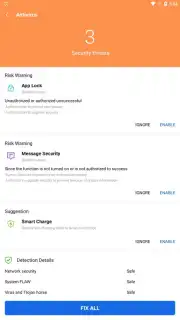
The app management utility provides a consolidated view of all installed software, enabling batch uninstallation. This removes the need to navigate individual system settings menus for removing multiple applications. Furthermore, the integrated antivirus engine conducts signature-based scans on files and applications, checking for known malware patterns. It also includes a basic web protection feature that warns users about accessing potentially hazardous websites, though the depth of its real-time protection is limited compared to dedicated security suites. A notable aspect is the optional 'Turbo' mode, which is advertised to provide an ad-free experience and potentially more aggressive background process termination.
- Deep System Cleaner: Scans for hidden cache, duplicate files, and residual data to free up significant storage space.
- RAM & Performance Booster: Manually stops background applications and services to allocate more resources to active tasks.
- Batch App Manager & Antivirus: Enables mass app uninstallation and provides basic malware scanning for device security.
We suggest trying Phone Master if you require a centralized tool for manual device maintenance tasks like storage cleanup and app management. Consider downloading it to handle these utility functions through a single interface.
Disclaimer: This application requires an internet connection for antivirus updates and certain features. It may offer in-app purchases, such as for the 'Turbo' upgrade. The app may collect and use device data for functionality, including storage scan results. It is not a substitute for comprehensive mobile security software. Use discretion when granting permissions and review the developer's privacy policy for data handling details.
Information
| Version | 6.1.7.00020 |
| Developer | TRANSSION MOBILE |
| Requirements | Android Android + 8.0+ |
| Updated | 17.03.2026 |
| Size | 47.24 MB |
| Package | com.transsion.phonemaster |
| Signature | f846e4634d9eccbab0a5a94511dfd5cf |
| Architecture | armeabi-v7a, arm64-v8a |


