


Photo Studio screenshots (4)

Description Photo Studio
Imagine having a darkroom and a digital art studio combined in your pocket, where any snapshot can be transformed into a curated image. Photo Studio by KVADGroup delivers this capability, providing a comprehensive toolkit for photo enhancement that moves beyond simple filters to offer detailed, layer-like control. This application consolidates the core functions of desktop editing software into a mobile interface, enabling both rapid stylistic changes and precise pixel-level adjustments.
Core Editing Capabilities and Tools
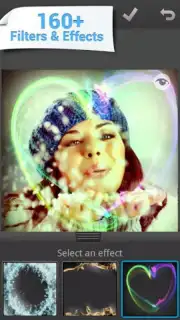
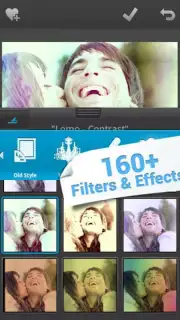
The application operates on a multi-layered editing system, beginning with its library of 125 one-tap visual filters. These include simulations of analog film stocks like Lomo, various vintage color grades, and modern popular styles comparable to those found on major social platforms. Each filter applies a pre-configured combination of adjustments to color saturation, contrast, and tone. Beyond these, a separate module contains 40 distinct overlay effects, such as light leaks, bokeh distortions, and texture additions like grain or scratches, which are applied independently to introduce specific artistic elements.
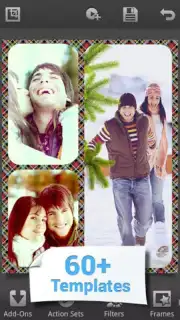
For structural editing, the app includes a suite of correction tools that mirror foundational Photoshop functions. Users can manually adjust exposure, color temperature, highlights, and shadows. Selective correction tools allow for the modification of specific output characteristics within an image, such as correcting lens vignetting or altering the clarity in defined areas. The framing utility offers over 50 templates, ranging from simple white borders to complex multi-frame collage layouts, which can be applied to a single image or used to combine multiple photos.
Output and Workflow Specifications
Once editing is complete, the export panel provides control over the final file. Users can save their work in three predefined resolution sizes—small, medium, and large—which correspond to common usage scenarios for web, social media, and personal storage. The application supports export in both JPG and PNG formats, with PNG preserving transparency where applicable, such as when using certain overlay effects or frames. The premium Turbo version, available via in-app purchase, removes all advertising from the editing workflow and may provide access to additional filter packs or export options.
- 125 one-tap visual filters
- 40 artistic overlay effects
- 50+ framing and collage templates
We suggest trying Photo Studio to handle everything from quick social media edits to detailed photo correction, all within a single, free-to-use application. Consider downloading it to explore the full range of its editing tools.
Disclaimer: This application requires an internet connection for initial download and potential access to additional online content. It contains in-app purchases for the Turbo version, which removes advertisements and may unlock premium features. The app may collect user data as outlined in the developer's privacy policy. Please be aware of any age restrictions suggested by the store listing and note that data usage charges may apply when downloading assets or updates.
Information
| Version | 2.9.3.4832 |
| Developer | KVADGroup |
| Requirements | Android Android + 6.0+ |
| Updated | 17.03.2026 |
| Size | 80.27 MB |
| Package | com.kvadgroup.photostudio |
| Signature | bd56dfcbb9980fa466bba26e45f8272a |
| Architecture | armeabi-v7a, arm64-v8a |


