


PhotoScan by Google Photos screenshots (9)








Description PhotoScan by Google Photos
Your Old Photos Deserve a Digital Revival
Tucked away in albums and boxes, your physical photos hold priceless memories, but they're fading with every passing year. You want to preserve them, but using a regular camera app often gives you a glare-ridden, crooked snapshot of a snapshot. What you need is a dedicated scanner, but who has one of those? Your phone is about to become that scanner. PhotoScan by Google Photos transforms your Android device into a powerful, intelligent photo digitizer. It’s the official Google tool designed to capture your printed pictures perfectly, turning fragile paper into flawless digital keepsakes with astonishing ease. This isn't just taking a picture of a picture; it's a guided, automated process that delivers a clean, professional-looking scan every single time.
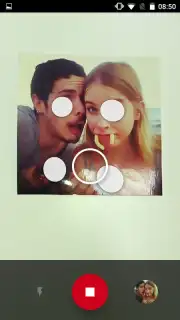
The magic happens through a brilliantly simple, step-by-step process. You place your photo on a flat surface, point your camera, and follow the on-screen dots. The app captures multiple images in seconds, then its powerful algorithms work behind the scenes. It automatically corrects the perspective, so your scan looks perfectly flat even if your angle wasn't. It intelligently removes any glare from overhead lights or flashes that ruin ordinary photos. Finally, it crops out the messy background—tabletops, album pages, your hands—leaving you with nothing but the pristine image, ready to save and share. All scanned photos are neatly saved to a dedicated folder on your device, and if you're not thrilled with a result, you can instantly undo and rescan in a heartbeat.
This app is a powerhouse for effortlessly archiving your life's moments, but it works best as a partnership. For optimal, magazine-quality results, you’ll get the best scans by centering your photo in the frame and ensuring you have good, even lighting. Think of it as giving the app’s smart tech the best raw materials to work with. While it performs minor miracles with glare and cropping, it can’t restore heavily damaged or extremely dark originals. The experience is completely ad-free, offering a smooth, uninterrupted workflow that lets you focus on the memories, not the process.
- Glare-Free Smart Capture: The app takes multiple shots to digitally eliminate annoying screen glare and reflections automatically.
- Automatic Edge Cropping: Intelligently detects and crops out backgrounds, leaving only your perfectly framed photo.
- Perspective & Tilt Correction: Fixes skewed angles in real-time to make scans look perfectly flat and professionally aligned.
We suggest trying PhotoScan by Google Photos to finally give your physical photo collection the clear, lasting digital home it deserves. Consider downloading it today and start your preservation project.
Internet required. IAP available.
Information
| Version | 8999.9999.9999 |
| Developer | Google LLC |
| Requirements | Android Android 4.4+ |
| Updated | 02.09.2026 |
| Size | 6.45 MB |
| Package | com.google.android.apps.photos.scanner |
| Signature | 61:ED:37:7E:85:D3:86:A8:DF:EE:6B:86:4B:D8:5B:0B:FA:A5:AF:81 |


