

Red Torrent Lite screenshots (2)
Description Red Torrent Lite
What Does a Streamlined BitTorrent Client Offer for Android?
For users seeking a direct method to acquire torrent files on an Android device, Red Torrent Lite by Red Lightning presents a focused solution. This application functions as a dedicated BitTorrent client, engineered to handle downloads through a multi-threaded architecture designed to maximize connection efficiency. Its operational model is built around processing a single download task at a time, which eliminates internal bandwidth throttling or artificial speed caps, potentially leading to faster completion times for individual files. It is important to note that this lack of throttling means the app will utilize the full available bandwidth, which can result in high data consumption; monitoring data usage within your mobile plan is advised.
Core Functionality and Network Optimization
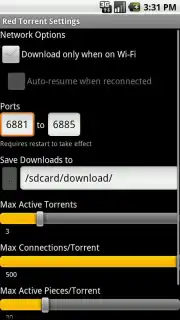
The application provides a suite of configuration settings aimed at optimizing the download process around user constraints. A primary feature is the ability to restrict downloads exclusively to Wi-Fi networks, a critical tool for preventing unintended mobile data expenditure. Furthermore, the client is programmed to automatically pause active downloads when a Wi-Fi connection is lost and seamlessly resume them once the connection is re-established, ensuring no download progress is wasted. This logic extends to power management, with options to govern behavior based on the device's charging status, allowing for automated pausing and resuming to conserve battery life during mobile use.
Granular Control and System Management
Beyond basic connectivity rules, Red Torrent Lite offers deeper technical controls for users who wish to fine-tune its operation. This includes the ability to adjust port configurations for potential connectivity improvements and to specify exact storage locations for downloaded files. Users can also manage the number of active connections per torrent and control the piece size used during downloads. These settings are instrumental in balancing system resource allocation, helping to conserve device memory and ensure the application runs efficiently without unduly impacting other device functions.
User Interface and Operational Feedback
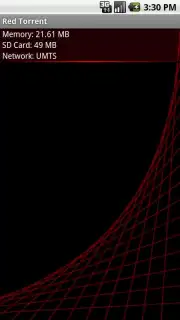
The interface is structured to provide clear status updates and management capabilities for ongoing downloads. A practical notification system alerts the user immediately upon the completion of a download, removing the need to constantly check the app manually. This combination of a straightforward user interface and these utility-focused features positions the app as a practical tool for managing torrent-based file acquisition directly from an Android smartphone or tablet, emphasizing utility and user awareness over superfluous features.
- Multi-threaded BitTorrent download engine
- Configurable Wi-Fi-only downloading
- Automated pause and resume functions
- Completion notifications and status alerts
Get your bonus of unfiltered download speed and take direct control of your file acquisition. Start managing your torrents efficiently today.
Download mobile app now
Disclaimer: This application requires an active internet connection and is intended for downloading files via the BitTorrent protocol. Users are solely responsible for the content they download and must comply with all applicable copyright and local laws. This app may contain in-app purchases. Data consumption can be very high; monitor your usage to avoid excess charges. Not all content or file sources may be safe; ensure you have adequate security software. This app is not intended for users under the age of 18 due to the nature of unregulated content networks. User data may be used for operational purposes as outlined in the developer's privacy policy.
Information
| Version | 12.7.6 |
| Developer | Red Lightning |
| Updated | 17.03.2026 |
| Size | 259.45 KB |
| Package | net.redlightning.redtorrentlite |
| Signature | 9b47b83c8298a1c840b52505ea507b10 |


