

Root Tweaker screenshots (2)

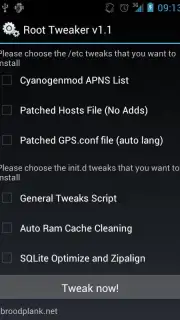
Description Root Tweaker
What if you could unlock the full potential of your Android device?
Root Tweaker provides a suite of advanced tools designed for users who have administrative access to their Android system. It offers granular control over system parameters that are typically inaccessible, allowing for deep customization and performance tuning. The app functions as a centralized dashboard for applying modifications, adjusting kernel settings, and managing system-level components, moving beyond the limitations of standard settings menus.
Core Functionality and System Tools
The application's primary utility lies in its ability to modify build.prop and other configuration files directly. Users can alter device identification strings, enable hidden developer features, and adjust system properties that govern performance and behavior. A key module allows for the management of CPU frequencies and governors, providing direct influence over processor performance and power consumption. Additional tools include options for clearing system caches in bulk, managing automatic startup applications, and modifying animation scales to alter the perceived speed of the user interface.
Operational Advantages and Interface Design
Root Tweaker presents its extensive functionality through a tabbed interface that categorizes tools logically, such as BuildProp Editor, CPU Tweaker, and System Cleaner. This layout prioritizes discoverability and reduces the risk of navigating to unrelated settings. The app performs validity checks on edits to critical system files to help prevent boot loops, a common risk with manual modifications. Its design is utilitarian, focusing on presenting options and current system states clearly without unnecessary visual embellishment.
- Granular Build.prop Editor: Directly modify system properties for device spoofing and feature unlocking.
- CPU Frequency and Governor Control: Adjust processor performance profiles and set maximum/minimum clock speeds.
- Comprehensive System Cleaner: Remove temporary files and app caches from multiple partitions simultaneously.
- Startup Application Manager: Disable or enable services and applications that launch on system boot.
- Visual Tuning Module: Customize transition, window, and animator duration scales for a snappier UI.
Start optimizing your rooted device today.
Download mobile app now
Requires a stable internet connection for initial setup and access to certain modules. This app requires a rooted Android device running Android 10 or higher. Use with caution, as modifying system files can cause instability. Some features or modules may be locked or available via in-app purchases.
Information
| Version | 1.1 |
| Developer | broodplank |
| Requirements | Android Android + 10+ |
| Updated | 17.03.2026 |
| Size | 440.72 KB |
| Package | com.broodplank.roottweaker |
| Signature | 2275df6758f1a24d7a84d7bcce452c43 |


