


Samsung Calendar screenshots (3)
Description Samsung Calendar
Never Miss a Beat with Your Samsung Device?
Tired of juggling appointments, birthdays, and daily tasks in your head? The Samsung Calendar app is your dedicated planning hub, engineered specifically for the Samsung ecosystem to bring seamless, comprehensive control over your schedule. It transforms your device into a powerful personal assistant, ensuring every important moment is captured, managed, and remembered without clutter or distraction.
Core Functionality & User Experience
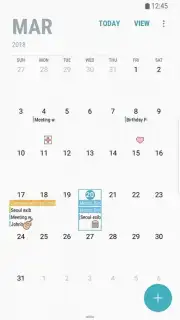
This application provides a clean, intuitive interface that prioritizes your events. Adding an appointment is a matter of tapping your chosen date and entering the details—no complicated menus or unnecessary features to slow you down. It’s built for efficiency, allowing you to log event durations, locations, and notes in seconds. The app syncs across your Samsung devices, giving you a unified view of your commitments wherever you are.
Beyond basic entries, it offers robust reminder systems. You can set multiple, customizable alerts for any event, from a critical business meeting to a family anniversary, ensuring you’re always prepared. The app acts as a reliable central repository for all time-based information, effectively eliminating the stress of forgotten plans and last-minute scrambles.
-
Smart Reminder Systems: Configure multiple alerts for any event to guarantee perfect timing for meetings and personal occasions.
-
Life-Event Tracking: Permanently save and annually recur important personal dates like birthdays and anniversaries with zero effort.
-
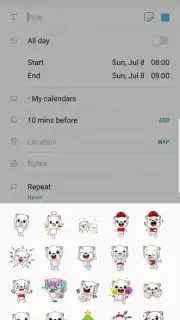
Streamlined Event Creation: Tap any date on the clear calendar view to instantly open a detailed entry form for fast scheduling.
Your Command Center for Daily Planning
Mastering your weekly and monthly agenda becomes straightforward. The Samsung Calendar app is designed to handle the complexity of modern life, providing a single, authoritative source for all your planning. By consistently logging your events, you build a searchable history and a predictable roadmap for your time, enhancing both productivity and peace of mind.
Download the Samsung Calendar app now! Take immediate control of your time and transform how you organize your life. Get it today and experience stress-free scheduling!
Disclaimer: This application requires an internet connection for initial download, potential updates, and syncing across devices. It may contain in-app purchase options. Please be aware of data usage charges from your provider. User eligibility may be subject to age restrictions and device compatibility. Always review the app's permissions and privacy policy before installation.
Information
| Version | 13.0.07 |
| Developer | Samsung Corporation |
| Requirements | Android Android + 12+ |
| Updated | 17.03.2026 |
| Size | 9.11 MB |
| Package | com.samsung.android.calendar |
| Signature | d087e72912fba064cafa78dc34aea839 |
| Architecture | universal |


