

Samsung LockStar screenshots (5)

Description Samsung LockStar
Your Lock Screen, Your Rules. No Compromises.
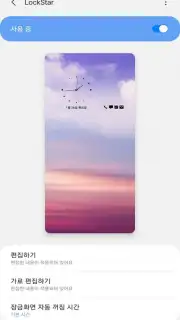
Tired of staring at the same generic lock screen every single day? That bland, impersonal gateway to your phone doesn't have to be your reality. Imagine a lock screen that feels like a true extension of your personality, meticulously crafted by you, for you. Samsung LockStar hands you the creative keys to transform that static screen into a dynamic expression of your style in mere seconds. This isn't just about changing a wallpaper; it's about commanding every single element to align perfectly with your vision, creating an experience that feels uniquely and undeniably yours every time you wake your device.
This powerful personalization tool goes far beyond the basics. You gain deep, granular control to design an interface that works exactly how you want it to. Forget settling for default settings that don't quite fit. With Samsung LockStar, you become the designer, tweaking and perfecting the visual flow of your most-viewed screen until it’s a perfect match for your taste and functionality needs.
Craft Every Detail, From Top to Bottom
The magic of Samsung LockStar lies in its comprehensive customization. It understands that true personalization is in the details—the placement of a clock, the style of a date, the overall composition. This app lets you dive into those details with an intuitive interface that makes professional-level design feel simple and immediate.
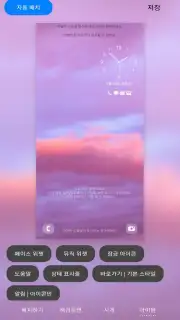
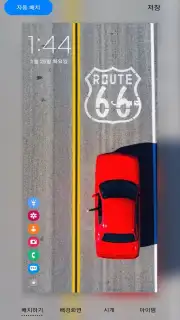
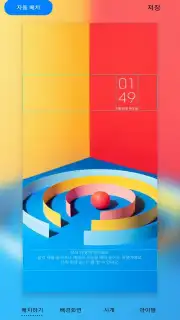
- Redesign Your Clock & Date Widgets: Don't just tell time, display it with style. Choose from various clock designs and fonts, then position them anywhere on your lock screen. Set the date format exactly to your liking, creating a cohesive and informative header that’s both beautiful and functional.
- Achieve a Perfectly Balanced Layout: Take control of the entire lock screen canvas. Easily adjust the placement of all elements—notifications, shortcuts, status bar icons—to eliminate clutter and achieve a clean, balanced, and aesthetically pleasing layout that’s easy to navigate at a glance.
- Enjoy a Premium, Ad-Free Experience: Focus purely on creativity without any interruptions. The experience is streamlined and immersive, ensuring your customization session is smooth, fast, and entirely focused on bringing your personal lock screen vision to life.
This is your invitation to break free from the ordinary. Why settle for a lock screen that looks like everyone else’s when you can have one that is authentically you? The process is surprisingly simple, but the impact is profound. Every time you reach for your phone, you’ll be greeted by a interface that you built, a small daily joy that reflects your personal aesthetic and makes your Samsung device feel truly personalized.
Download Samsung LockStar now and transform your lock screen today—exclusive, in-depth customization is waiting for your first touch!
Disclaimer: This application requires an internet connection for initial download and access to certain personalization services. It is designed for use with compatible Samsung Galaxy devices. Data usage may apply depending on your activity. Please check your device compatibility and system requirements before installation.
Information
| Version | 8.5.00.10 |
| Developer | Samsung Corporation |
| Requirements | Android Android 16+ |
| Updated | 02.09.2026 |
| Size | 76.84 MB |
| Package | com.samsung.systemui.lockstar |
| Signature | 9C:A5:17:0F:38:19:19:DF:E0:44:6F:CD:AB:18:B1:9A:14:3B:31:63 |
| Architecture | arm64-v8a |


