

Samsung Video Player screenshots (3)


Description Samsung Video Player
Imagine opening your gallery to relive a memory, only to be met with a generic player that struggles with the file. For Samsung smartphone users, that scenario is bypassed entirely by a dedicated, pre-installed solution designed for seamless playback right out of the box.
The Samsung Video Player is the default multimedia application integrated into the Android ecosystem of Samsung devices. It functions as a native hub for managing and playing video content stored locally on your device. This includes footage captured directly with your smartphone's camera, as well as video files downloaded from the internet or transferred from other sources. The player is engineered to handle these files without requiring additional codec downloads, providing a straightforward viewing experience directly from your device's storage.
Core Functionality and User Controls
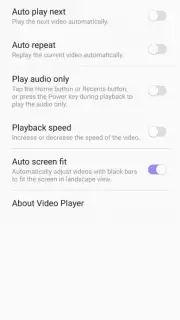
The application provides a settings menu where users can configure various playback behaviors to match their preferences. These are operational controls, not subjective enhancements. You can toggle the auto-play function, which determines whether the next video in a folder will begin automatically once the current one finishes. A separate loop function allows you to set a single video to replay continuously from the start. For playback scaling, you are given a choice: you can force videos to fill the entire screen, which may crop the edges, or you can select the original aspect ratio to view the content as it was recorded, potentially with black bars on the sides.
Key Feature Overview
- Play video files recorded by your Samsung smartphone camera without conversion.
- Supports playback of downloaded videos stored in your device's local memory.
- Configurable auto-play toggle for sequential video playback in a folder.
- Includes a loop function to restart a single video upon completion.
- Offers display mode selection between screen-fill and original aspect ratio.
We suggest trying the Samsung Video Player to utilize the optimized video playback system already present on your Samsung device. Consider downloading it to access a straightforward tool for managing your local video library.
Disclaimer: This application requires access to video files stored on your device's internal memory or SD card. It operates offline for local files but may require an internet connection for accessing certain cloud-linked features or metadata. The app is pre-installed on Samsung Android devices; ensure your device meets the required system version. Data usage applies only if online features are used. It may contain in-app purchases for potential premium features not described in this core functionality overview. Please check the product listing for age ratings and specific permissions.
Information
| Version | 7.3.50.19 |
| Developer | Samsung Electronics |
| Requirements | Android API 36+ |
| Updated | 17.03.2026 |
| Size | 12.27 MB |
| Package | com.samsung.android.video |
| Signature | d087e72912fba064cafa78dc34aea839 |
| Architecture | arm64-v8a |


