

Samsung Watch ClockFace screenshots (5)

Description Samsung Watch ClockFace
Your Samsung Watch Is a Blank Canvas. It's Time to Create Your Masterpiece.
Imagine glancing at your wrist and seeing not just the time, but a tiny, personal work of art that reflects your mood, your style, or your favorite memory. That’s the daily experience Samsung Watch ClockFace unlocks. This isn’t just another utility app; it’s your direct creative studio, built right into the Samsung ecosystem via Good Lock. Your watch face is the most viewed screen on your device, seen dozens of times a day. Why let it be generic? This tool hands you complete control to design a timepiece that is uniquely, unmistakably yours, transforming a simple gadget into a personal statement you’ll enjoy from morning to night.
Craft a Watch Face That Actually Feels Like You
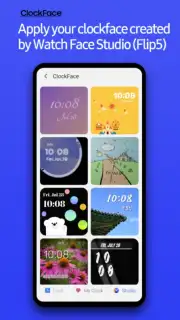
Forget scrolling through limited, static options. Samsung Watch ClockFace redefines personalization with a depth that feels both empowering and surprisingly simple. The journey begins in a vast, curated gallery of pre-made designs. You’ll find everything from sleek, minimalist digital readouts to beautifully detailed analog faces that mimic classic watches. See one you like? Apply it with a single tap for an instant upgrade.
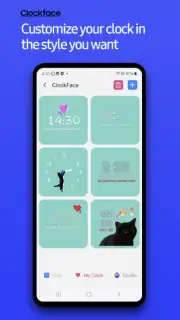
But the real magic happens when you decide to build from the ground up. The intuitive visual editor is your playground. Want to change the color of every single element? Go ahead. Swap out the font for something more elegant or playful? Absolutely. Adjust the time format, tweak the positioning, or play with the transparency to let your background wallpaper shine through—every edit is reflected in real time. This is where you stop customizing and start creating.
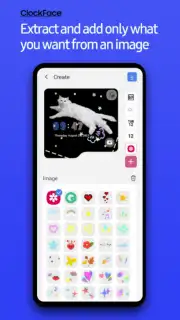
And creation doesn’t stop with colors and fonts. You can layer on personal text, a favorite photo, fun stickers, or even a looping animated GIF. Picture your watch face displaying a motivational quote, a tiny photo of your pet, or a subtle, moving background. The level of detail is astounding, letting you adjust the precise shape of analog watch hands or the overall scale of the widget to achieve the perfect look. Whether your taste leans towards sophisticated analog or crisp digital, you have the freedom to tailor every pixel.
Seamless Integration for a Flawless Experience
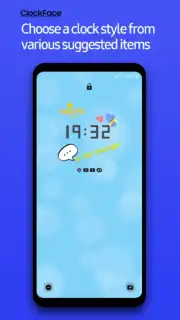
This powerful customization integrates perfectly with your Samsung device’s core features. If you rely on the Always On Display feature to quickly glean information, you’ll be thrilled to know Samsung Watch ClockFace is fully compatible. Your custom-designed face, whether chosen from the gallery or built by you, can be set to display elegantly on the Always On Display. This means you get to see your unique creation constantly, accessing the time and your chosen elements without ever needing to wake or unlock your device—it’s both brilliantly functional and a constant delight.
The experience is streamlined and distraction-free. Thanks to integration with system tools like Turbo, you enjoy a smooth, fluid design process without any intrusive advertisements cluttering your creative flow. It’s all about putting that powerful personalization front and center.
- Total Creative Freedom: Modify every aspect: colors, fonts, time format, element position, transparency, and size.
- Rich Media Library: Add personal text, custom images, stickers, and animated GIFs to your design.
- Extensive Pre-Designed Gallery: Instantly apply beautiful, ready-made analog and digital watch faces.
- Intuitive Real-Time Editor: See every change live as you design, with a user-friendly drag-and-drop interface.
- Always On Display Support: Your custom creations work flawlessly with the Always On Display feature.
- Ad-Free Experience: Enjoy seamless customization without interruptions, powered by system optimization.
You’ve imagined a watch that’s perfectly yours. Now it’s time to build it. Consider downloading Samsung Watch ClockFace via the Good Lock module to unlock this level of deep, satisfying personalization. Transform your Samsung watch from a standard tool into a dynamic accessory that brings a smile to your face every single time you check the time.
Heads up: you'll need wifi for most features. Some cool stuff is extra.
Information
| Version | 3.3.07.1 |
| Developer | Samsung Electronics Co., Ltd. |
| Requirements | Android Android + 15+ |
| Updated | 17.03.2026 |
| Size | 149.99 MB |
| Package | com.samsung.android.app.clockface |
| Signature | d087e72912fba064cafa78dc34aea839 |
| Architecture | armeabi-v7a, arm64-v8a |


