


Screen Mirroring - Castto screenshots (3)
Description Screen Mirroring - Castto
Looking for a straightforward method to project your Android smartphone's display onto a larger TV screen? Screen Mirroring - Castto by SoomApps provides a direct solution for wireless screen casting, enabling users to extend their mobile interface for media viewing, photo sharing, or gaming on a television.
Core Functionality and Setup Process
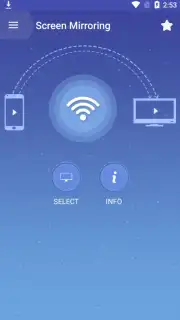
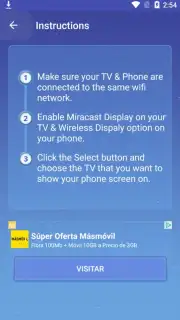
The application operates on a standard principle of device synchronization over a shared local Wi-Fi network. The primary requirement is that both the Android smartphone and the target television are connected to the same wireless network. The app then scans for compatible display devices, such as smart TVs with enabled Miracast or similar screen mirroring protocols. Connection is typically established within moments, after which the smartphone's screen is replicated in real-time on the television. This process does not involve complex configuration, focusing instead on a minimal setup sequence.
Technical Compatibility and Interface Design
Screen Mirroring - Castto is engineered for broad compatibility with internet-enabled televisions and streaming devices that support common casting standards. The user interface is minimalistic, consisting primarily of a device discovery menu and a connection toggle. This design eliminates unnecessary menus, directing user attention to the core function of initiating and terminating a mirroring session. The absence of intrusive advertising in its core operation, particularly when utilizing its optimized performance mode, allows for an uninterrupted viewing experience.
Practical Use Cases and Performance
Once connected, the application mirrors all smartphone activity, from navigating menus and applications to playing video content from any source. This turns the television into a secondary monitor, useful for presentations, sharing web content, or playing mobile games on a larger display. The mirroring latency is dependent on local network conditions, but the connection aims for stability suitable for most media consumption purposes.
- One-Touch Device Connection: Initiate screen mirroring to compatible TVs and streaming sticks with a single tap after initial network setup.
- Universal TV Compatibility: Designed to work with most modern smart TVs supporting standard Miracast or built-in casting receiver functions.
- Uninterrupted Real-Time Mirroring: Stream your phone's display, including videos, photos, and apps, to the big screen with minimal lag.
This utility app transforms your television into a wireless secondary display, streamlining how you share content from a handheld device.
Download the Screen Mirroring - Castto mobile app now to access exclusive, ad-free performance features for a limited time—this optimized version is available today for the first users who install.
Internet required. IAP available.
Information
| Version | 2.9.8 |
| Developer | SoomApps |
| Requirements | Android Android + 7.0+ |
| Updated | 17.03.2026 |
| Size | 46.01 MB |
| Package | com.soomapps.screenmirroring |
| Signature | 42309f319b89030bdd26c75d28a81296 |
| Architecture | armeabi-v7a, x86, arm64-v8a, x86_64 |


