

Screen Mirroring screenshots (4)
Description Screen Mirroring
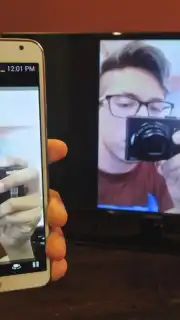
What if you could instantly extend your smartphone's display to your living room television without a single cable? Screen Mirroring by yousuf53 is a utility-focused application designed to facilitate exactly that, enabling wireless video playback from your mobile device to a compatible TV. It functions as a dedicated bridge for your media, handling files stored locally on your phone as well as content streamed from major platforms like YouTube and Vimeo, consolidating your viewing experience onto a larger screen.
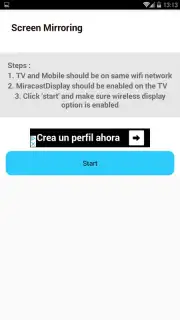
The core operation is built on standard Wi-Fi Direct protocols. The primary requirement is that both your smartphone and your television are connected to the same local Wi-Fi network. On the receiving display, you typically need to enable a screen reception mode, often labeled as 'Miracast Display', 'Screen Casting', or similar depending on the TV manufacturer. Once this environment is established, control shifts entirely to the app; initiating a stream is a matter of selecting your target device and pressing the 'Start' button. Playback commences automatically, with the phone effectively serving as the media source.
Functionality and User Experience
Beyond the primary mirroring function, the application incorporates a set of basic remote control capabilities. This allows for a degree of post-connection management directly from your phone, such as adjusting playback volume or navigating between different video files or streams. The developer notes the availability of a 'Turbo' feature, which is presented as a means to enhance performance and unlock additional utilities, presumably through an in-app purchase. A significant point highlighted is the absence of display advertisements during the core mirroring activity, which contributes to an uninterrupted viewing session.
Key Features in Detail
- Universal Video Playback: Mirrors both locally stored mobile videos and streamed content from platforms like YouTube.
- Wireless Wi-Fi Connection: Operates over a shared local network, requiring no physical cables or connectors.
- Simplified One-Touch Start: Initiates screen mirroring to your TV with a single 'Start' button press after setup.
- Integrated Basic Remote: Provides on-screen controls for volume adjustment and media navigation.
- Ad-Free Mirroring Experience: Projects your content without overlay banner or video advertisements.
We suggest trying Screen Mirroring if you frequently watch mobile-sourced videos and desire a straightforward, cable-free method to display them on your television.
Download the mobile app now.
Disclaimer: This application requires a stable internet connection for initial setup and for streaming hosted content. Full functionality may require in-app purchases. Use of this app should comply with the terms of service of video platforms. Data usage applies when streaming. Screen mirroring performance is dependent on local network conditions and device compatibility.
Information
| Version | 2.0 |
| Developer | yousuf53 |
| Requirements | Android Android + 4.2, 4.2.2+ |
| Updated | 17.03.2026 |
| Size | 3.22 MB |
| Package | screenmirroring.full.com.screenmirroring |
| Signature | 220ff80883f96bb21709db7921cd013c |
| Architecture | universal |


