

Seconds Clock Widget screenshots (4)
Description Seconds Clock Widget
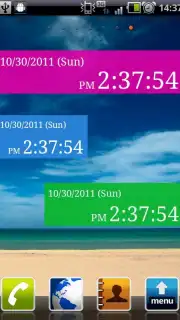
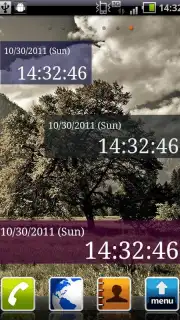
Want a clock that does more than just tell time? Transform your Android home screen into a dynamic, personalized command center with the Seconds Clock Widget. This isn't just another time-telling app; it's a precision tool that delivers granular, at-a-glance time tracking with deep customization, all designed to integrate seamlessly into your device's ecosystem without draining performance.
Advanced Customization for a Truly Personal Display
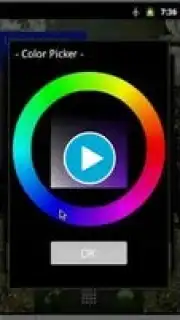
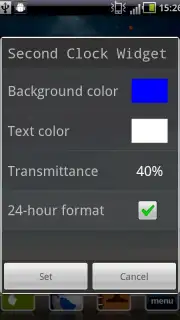
Move beyond static clocks. The Seconds Clock Widget provides extensive control over every visual element, allowing you to tailor the display to match your wallpaper, theme, or mood. Adjust the exact HEX code for the background and text colors, fine-tune transparency levels for a subtle layered effect, and modify font weights. This granular control ensures your widget is always clear, stylish, and perfectly legible against any home screen setup. The intuitive configuration panel makes applying these changes quick and straightforward, turning complex customization into a simple, satisfying process.
Optimized Performance and Seamless Android Integration
Engineered specifically for Android, this widget operates with minimal system overhead, ensuring your device's battery life and responsiveness remain unaffected. It delivers pixel-perfect, real-time accuracy for seconds, minutes, and hours, syncing flawlessly with your device's core timekeeping. The clean, efficient codebase guarantees a smooth, reliable experience with no unexpected lag or glitches, making it a dependable and visually cohesive addition to your personalized interface.
Core Features at a Glance
- Fully customizable color palette
- Adjustable transparency and font
- Zero-lag, real-time precision
- Clean, ad-free interface (Turbo)
Download the Ultimate Time Management Tool Today
Why settle for a basic clock when you can have a powerful dashboard? Exclusive early access to premium customization packs is available for the first 1,000 users this week. Transform your home screen functionality—download the Seconds Clock Widget for Android now and redefine how you see time.
Heads up: you'll need wifi for the initial setup and widget updates. Some advanced visual themes and customization packs are extra.
Information
| Version | 1.2.6 |
| Developer | in-trinity |
| Updated | 17.03.2026 |
| Size | 195.42 KB |
| Package | jp.co.intri.second.clock |
| Signature | d7832c115f07fa3e28d733140079a312 |


