

Sound Assistant screenshots (5)
Description Sound Assistant
Tired of One-Size-Fits-All Sound on Your Samsung?
Does your Galaxy phone treat every app's sound the same, forcing you into a constant volume battle between your music, games, and calls? Meet Sound Assistant, the official Samsung utility designed to put you in absolute command of your device's audio landscape. This powerful tool transforms the standard volume rocker into a precision instrument, allowing for granular, app-by-app audio control and personalized sound profiles that adapt to your life.
Master Every Detail of Your Galaxy's Audio
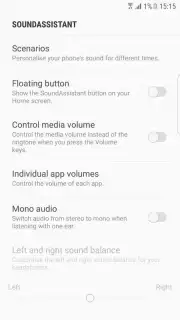
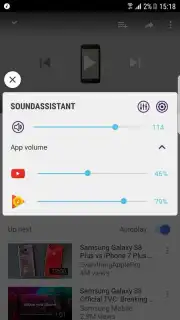
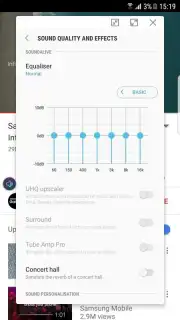
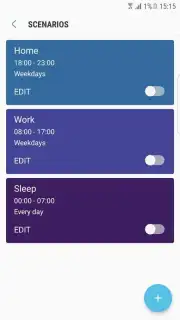
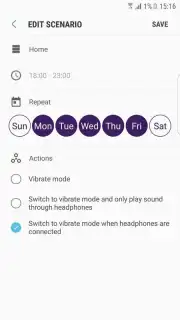
Sound Assistant unlocks a professional level of audio management directly from your Samsung smartphone. It seamlessly integrates with your device, replacing the basic volume pop-up with a sophisticated control panel. This lets you independently adjust the volume for your music player, browser, game, and messaging app simultaneously, so a loud notification never drowns out your podcast again. Beyond simple volume, you can craft custom sound profiles tailored for different scenarios—like a focused "Work" mode with muted media and a vibrant "Evening" mode for enhanced bass. These profiles can even be scheduled to activate automatically at set times, seamlessly shifting your audio environment from day to night.
The app provides a convenient floating shortcut button for instant access to these settings from any screen. Crucially, the experience is streamlined and focused, free from disruptive advertisements, ensuring your audio adjustments are quick and uninterrupted.
- Individual App Volume Control: Adjust the volume for your music, games, and apps independently for a perfect audio mix.
- Create Custom Scheduled Sound Profiles: Build and automate unique audio setups for work, relaxation, or sleep that activate at preset times.
- Enhanced Volume Rocker Interface: Transform your side buttons with a detailed slider and quick-toggle menu for precise adjustments.
- Adjust Vibration Intensity: Fine-tune haptic feedback strength to match your custom sound profiles and time of day.
- Quick Access Floating Button: Instantly open sound settings from any app with a persistent, movable on-screen shortcut.
Take charge of your auditory experience and make your Samsung Galaxy sound exactly how you want it to, in every situation. Download Sound Assistant now and claim your personalized audio advantage!
Disclaimer: This application requires a compatible Samsung Galaxy device and an internet connection for initial download and updates. The app is free to use; certain advanced features may vary by device model or region.
Information
| Version | 8.5.00.1 |
| Developer | Samsung Electronics Co., Ltd. |
| Requirements | Android Android + 16+ |
| Updated | 17.03.2026 |
| Size | 26.89 MB |
| Package | com.samsung.android.soundassistant |
| Signature | d087e72912fba064cafa78dc34aea839 |
| Architecture | armeabi-v7a, x86, arm64-v8a, x86_64 |


