

Sunrise Calendar screenshots (4)

Description Sunrise Calendar
What Defines a Truly Integrated Calendar Experience on Android?
In the landscape of Android productivity tools, a calendar's core function extends beyond simple date tracking. The essential question is how effectively it consolidates disparate schedules into a single, actionable view. Sunrise Calendar, developed by Microsoft Corporation, approaches this by positioning itself not just as a standalone application but as a central hub. Its primary operational mechanic is deep synchronization with Google Calendar, creating a foundational layer where all pre-existing events—from birthdays to system alarms—are aggregated without manual entry. This initial data import is a critical technical step that transforms the app from an empty slate into an immediately useful planning instrument.
Functional Analysis and Customization Framework
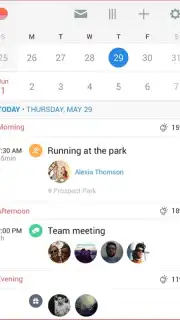
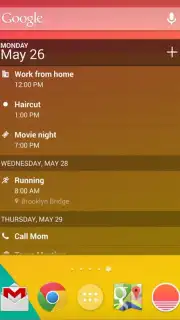
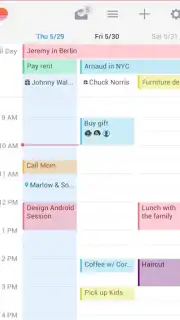
Beyond initial synchronization, the application's interface is designed for visual clarity and user-defined organization. The system provides granular control over event categorization through a customizable tagging system for contacts and appointments. This functionality allows users to implement a color-coded or icon-based organizational schema, making the differentiation between various event types intuitive at a glance. The absence of advertising within the app interface ensures an uninterrupted workflow, a design choice that prioritizes user focus over monetization in the core viewing experience. The customization extends to the visual presentation, permitting adjustments that affect the aesthetic layout without compromising the calendar's underlying utility for tracking meetings and critical deadlines.
The operational value is realized through the combination of automated data handling and manual personalization tools. It functions as a simple yet powerful overlay to existing digital schedules, enhancing them with a more visually distinct and user-tailored interface. The mechanics are straightforward: it pulls data from a primary source (Google Calendar) and provides a suite of tools to re-label, color-code, and display that information according to personal preference.
- Automated Google Calendar Sync: Imports all existing events, birthdays, and reminders seamlessly, establishing a comprehensive schedule from first launch.
- Advanced Visual Customization: Offers extensive personalization of colors, icons, and tags to create an intuitive, visually distinct calendar system.
- Ad-Free User Interface: Maintains a clean, focused environment by eliminating advertisement placements within the core app experience.
- Centralized Event Management: Acts as a unified hub for tracking and managing all appointments, meetings, and important dates.
- Intuitive Alert System: Supports customizable notifications for events, ensuring reminders are clear and contextually recognizable.
This app provides a direct path to a more organized digital schedule. For a limited time, new users can access its full synchronization and customization suite without initial barriers. Download the mobile app now to configure your calendar interface today.
Disclaimer: This application requires an internet connection for initial synchronization and certain features. It may offer in-app purchases. Data usage applies when syncing across devices. Please review the app's data privacy policy on the official store listing. The developer, Microsoft Corporation, sets all terms and age restrictions.
Information
| Version | 4.2.0 |
| Developer | Microsoft Corporation |
| Requirements | Android Android + 4.0, 4.0.1, 4.0.2+ |
| Updated | 17.03.2026 |
| Size | 10.07 MB |
| Package | am.sunrise.android.calendar |
| Signature | 7fc349ccdc3489718db7e6b86d40d299 |
| Architecture | armeabi, armeabi-v7a, mips, x86 |


