


SwiftKey Keyboard screenshots (13)


Description SwiftKey Keyboard
What if your smartphone keyboard could learn to think like you do?
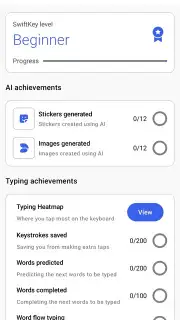
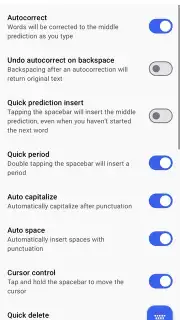
The SwiftKey Keyboard for Android, developed by Microsoft, moves beyond a simple input tool to become a predictive extension of your personal communication style. Its core function is built on an adaptive AI engine that continuously analyzes your individual typing patterns, vocabulary, and habits. This analysis populates a personal language database unique to your device, which in turn powers two critical features: highly accurate auto-correction that understands context, and a predictive text engine that anticipates your next word with notable precision. The system is designed for efficiency, aiming to reduce manual keystrokes and corrective taps significantly over time.
A Deeply Personal Typing Interface
Customization is a central pillar of the SwiftKey experience. Upon installation, users gain access to an extensive library of free, downloadable themes that can alter the keyboard's color scheme, background imagery, and key shapes without requiring third-party apps. For ultimate personalization, the tool includes a theme builder, allowing you to create a completely unique design by uploading personal photos and adjusting transparency, key colors, and pop-up styles. This level of aesthetic control ensures the keyboard can integrate seamlessly with any device theme or user preference.
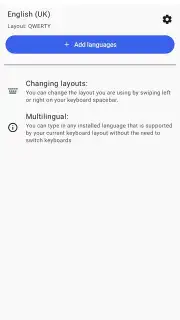
A defining feature for one-handed operation is SwiftKey Flow. This gesture-typing mode enables word formation by sliding a finger across the key tops from letter to letter, eliminating the need for individual key presses. The AI seamlessly interprets the gesture path, and the system concurrently performs real-time error checking, automatically inserting spaces and correcting common misspellings as you glide. For global users, SwiftKey offers robust multilingual support, capable of handling over 400 languages. Users can enable multiple languages simultaneously, and the keyboard will intelligently recognize and predict words in the appropriate language without requiring manual switching, making it exceptionally useful for bilingual communication or language learning.
- AI-Powered Prediction & Correction: An adaptive engine learns your personal typing style to deliver precise auto-correction and context-aware word predictions, speeding up all text entry.
- Extensive Visual Customization: Choose from a vast gallery of free themes or use the built-in creator to design a completely unique keyboard background from your own photos.
- Gesture Typing & Multilingual Support: Use SwiftKey Flow for swipe-to-type efficiency and type seamlessly in over 400 languages with simultaneous active language support.
This keyboard transforms routine typing into a streamlined, personalized process. It replaces constant correction with proactive assistance, turning your unique language patterns into its core operating logic.
Download SwiftKey Keyboard now! Experience the difference a truly intelligent and adaptable keyboard makes—get it immediately and stop fighting with your phone's default input method!
Disclaimer: This application requires an internet connection for initial theme downloads and certain AI model updates. It may request permissions for network access, personal dictionary storage, and contact integration for name prediction. The app is free to use with optional in-app purchases for premium theme packs. Data usage and privacy practices are governed by the developer's policy. Please check the product page for age ratings and specific device compatibility requirements.
Information
| Version | 9.13.14.5 |
| Developer | SwiftKey |
| Requirements | Android Android 8.0+ |
| Updated | 15.09.2026 |
| Size | 42.42 MB |
| Package | com.touchtype.swiftkey |
| Signature | d5748003cd4bf73c7a468eeb36caec84b7785c26 |
| Architecture | armeabi-v7a |


