

Ultimate Backup screenshots (8)
Description Ultimate Backup
Your Android's Data, Finally Under Your Control
Imagine this: you're about to try a new custom ROM, or perhaps you're resetting your phone to solve a nagging issue. That moment of hesitation hits—what about all your text messages, your carefully configured Wi-Fi passwords, your app data? That sinking feeling of potential loss is exactly what Ultimate Backup by JRummy Apps is designed to eliminate. This isn't just another backup tool; it's a comprehensive command center for every piece of data on your Android device, transforming anxiety into absolute confidence. You gain a level of oversight typically reserved for system administrators, putting the power to protect, manage, and optimize directly in your hands.
A Deep Dive into Total Data Management
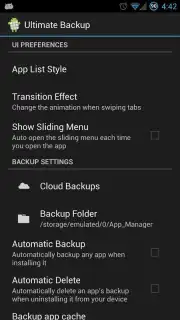
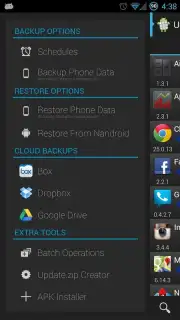
Ultimate Backup functions as the Swiss Army knife for your device's digital life. You start with its core strength: creating incredibly detailed backups. You can choose to back up virtually anything—from your call logs and SMS conversations to your browser bookmarks and specific app data. The flexibility is key; you decide what's important. These backups aren't locked away. You can store them locally on your device for quick access or seamlessly sync them to your preferred cloud service like Google Drive, Dropbox, or Box, ensuring your data is safe even if your hardware fails.
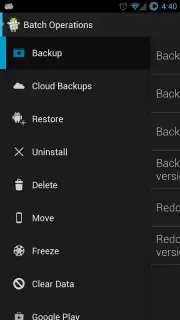
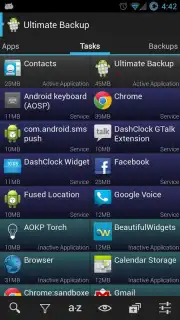
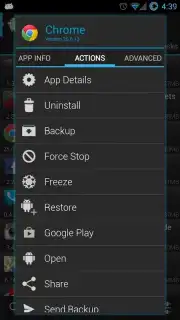
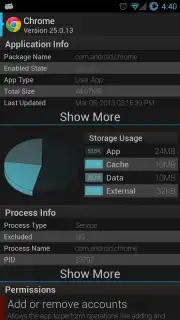
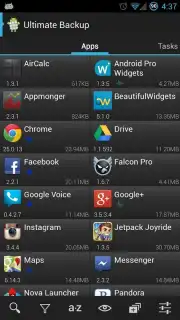
Beyond simple backup, the app opens up advanced management suites. The built-in task manager lets you see exactly what's running in the background. You can stop resource-hogging apps with a tap, reclaiming RAM and boosting your device's responsiveness instantly. For those who like to tinker, the application manager provides powerful tools to convert user apps to system apps, examine APK files in detail, and even batch uninstall applications you no longer need. It’s about giving you granular control over every installed component.
Unlocking the True Potential with Premium
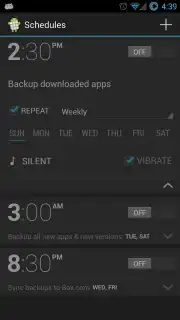
The free version is powerful, but upgrading to the premium Turbo version removes all limitations and advertisements, unlocking a truly automated, professional-grade experience. This is where convenience reaches its peak. You can set a custom scheduler, so your backups happen automatically overnight or weekly without any reminder. The premium tier enables mass operations, allowing you to backup or restore dozens of apps and data sets simultaneously. For advanced users, it adds deep Nandroid backup integration for comprehensive system restoration and employs zipalign techniques to optimize your applications for smoother performance and slightly reduced storage footprint.
- Comprehensive Backup & Restore: Securely save and restore calls, messages, Wi-Fi settings, bookmarks, and both user and system application data.
- Flexible Storage Options: Keep backups locally or auto-sync to major cloud services including Google Drive, Dropbox, and Box.
- Advanced Device Management: Utilize a full task manager to stop processes, an app manager for batch actions, and tools to convert or analyze APKs.
- Automated Premium Tools: Upgrade for scheduled backups, mass operations, cloud auto-restore, Nandroid support, and ad-free zipalign optimization.
- Performance Optimization: Clean up running tasks, freeze apps, and optimize installed packages to improve device speed and stability.
Download the Ultimate Backup Mobile App Now
Don't wait for a data disaster to realize you need proper protection. For a limited time, new users can explore the robust free features and experience the power of complete data control. The premium Turbo upgrade offers an exclusive, streamlined experience that makes device management effortless. Take the definitive step to secure and master your Android device today—this level of access and peace of mind is just one tap away.
Disclaimer: Ultimate Backup requires an internet connection for cloud backup services and certain features. The app offers in-app purchases to unlock the premium Turbo version. Some advanced functions, such as backing up certain system data or converting apps, may require root access on your device. Data usage applies when syncing with cloud storage. Please be aware that modifying system components carries inherent risks and should be done by informed users. The app is intended for business and utility use.
Information
| Version | 3.1.4.0 |
| Developer | JRummy Apps |
| Requirements | Android Android + 3.0.x+ |
| Updated | 17.03.2026 |
| Size | 5.86 MB |
| Package | com.jrummy.app.managerfree |
| Signature | e9a8f084a211191e5b42b44ad051323b |
| Architecture | universal |


