

Unieye Drive screenshots (3)
Description Unieye Drive
Never Touch Your Camera Again: Remote Control in Your Pocket
Imagine needing to check a live feed or adjust a camera setting, but the device is mounted out of reach, in another room, or even another building. The inconvenience of physical access disrupts your workflow and peace of mind. Unieye Drive eliminates that friction entirely by transforming your Android device into a universal remote command center for compatible video cameras. This application delivers a streamlined hub for managing your visual content, turning complex camera operations into simple taps and swipes on your mobile screen. The experience is built around an intuitive interface that feels familiar from the first launch, guiding you seamlessly from live viewing to media library management without a steep learning curve.
Core Features for Complete Command
The application’s power lies in translating professional camera control into a mobile-friendly format. You gain direct oversight of your video ecosystem from anywhere with a connection.
Live Streaming and Remote Management
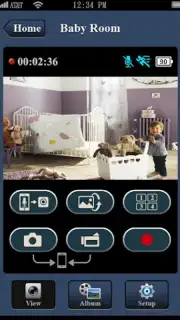
The core functionality provides a stable, real-time video feed directly to your device. You observe events as they happen, with minimal latency. Beyond passive viewing, the remote control feature allows you to manipulate camera settings digitally. This means adjusting parameters, changing modes, or starting/stopping recordings without ever touching the camera hardware, offering unparalleled convenience for monitoring and content creation.
Organized Media Library Management
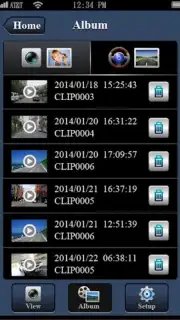
Your recorded videos are not just stored; they are intelligently organized. The app provides a dedicated space to sort, categorize, and review your video albums. You can quickly locate specific clips, preview content, and manage your files efficiently. This structured approach saves you from sifting through disorganized folders, giving you clear and immediate control over your growing media collection.
Simplified Camera Configuration
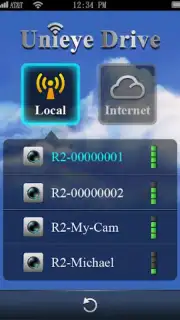
Initial setup and ongoing adjustments are designed for clarity, not complexity. The application presents camera configuration options in a logical, accessible manner. You can fine-tune recording quality, set up motion detection zones, adjust network settings, or schedule recordings through straightforward menus. This demystifies camera management, making advanced features practical and accessible directly from your handheld device.
An Uninterrupted Experience
The application operates without disruptive banner or video advertisements, maintaining focus on your content and controls. For users seeking enhanced performance, such as potential priority streaming or advanced feature unlocks, a Turbo option is available. This model ensures a clean interface for all users, with the possibility of elevating the experience based on your needs.
-
Live Viewing: Watch real-time, streaming video from your compatible cameras directly on your Android phone or tablet.
Full Remote Control: Adjust camera settings, change recording modes, and operate your camera remotely without physical contact.
Structured Media Library: Sort, browse, and manage all your recorded video albums in one organized, easy-to-navigate space.
Straightforward Configuration: Access and modify camera parameters through a simplified, user-friendly settings menu.
Ad-Free Interface: Use the core application without any advertising interruptions for a focused management experience.
Turbo Enhancement: An optional pathway to access potential performance boosts and premium features for a superior level of control.
Consider downloading Unieye Drive to centralize your camera management and interact with your video content from the palm of your hand.
Download mobile app now
Technical Disclaimer: This application requires an active internet connection for remote features and streaming functionality. Some features or performance enhancements may be accessed via in-app purchases (Turbo). Data usage charges may apply depending on your network plan. Use of this app implies agreement with the developer's Terms of Service and Privacy Policy. Compatibility is limited to specific Unieye and supported third-party video cameras; verify your hardware compatibility before use. The app may require permissions for network access, storage, and device location for full functionality.
Information
| Version | 1.8.10 |
| Developer | Unieye |
| Requirements | Android Android + 10+ |
| Updated | 17.03.2026 |
| Size | 20.18 MB |
| Package | com.UnieyeCar.smartphone |
| Signature | 33d191a313f985608bc6f49b8921f4b0 |
| Architecture | armeabi |


