

Video Converter Android screenshots (4)
Description Video Converter Android
Ever feel frustrated when a video just won't play on your phone? You find the perfect clip, tap to open it, and are met with an unsupported format error or choppy playback. What if you could solve that problem permanently, transforming any video file into a perfectly compatible format with just a few taps?
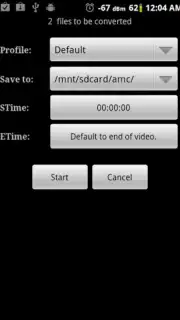
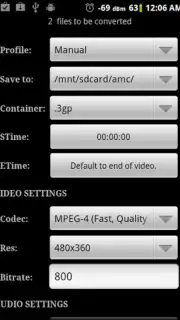
Video Converter Android takes a fundamentally different approach to handling media. Instead of cluttering your device with multiple niche video players, each claiming to support specific formats, this tool empowers you with universal compatibility through conversion. The core philosophy is elegant in its simplicity: convert virtually any video file you encounter into a high-quality MPEG4 format, the standard that ensures smooth, reliable playback on your Android device. This process not only guarantees compatibility but can also enhance the viewing experience by optimizing the file for your screen.
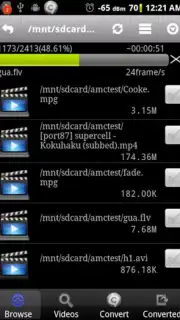
The application supports an extensive range of input formats, acting as a universal translator for your video library. You can seamlessly convert files from formats like ASF, AVI, DivX, FLV, M2V, M4V, MJPEG, MOV, MPG, OGG, OGV, RM, RMVB, WebM, and WMV. The output is a clean, efficient MPEG4 file, ready to be played in your favorite media player without any hiccups.
Beyond simple video conversion, the tool includes a powerful audio extraction feature. This allows you to strip the audio track from any video file and save it as a standard MP3. Imagine converting a music video, a lecture recording, or a documentary clip into a podcast-style audio file you can listen to anywhere. It effectively doubles the utility of your media collection.
The process is designed for patience over complexity. You trade the time required for conversion—a straightforward, set-and-forget task—for the long-term convenience of a streamlined, unified media library. No more juggling apps or facing format walls.
Core Features at a Glance
- Universal Video Conversion: Transform a vast array of video formats (including ASF, AVI, MOV, FLV, WMV, WebM, RMVB, and more) into high-compatibility MPEG4 files optimized for Android playback.
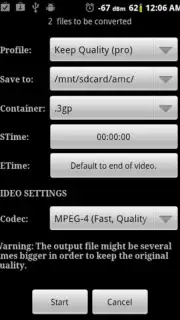
- High-Quality Output: Conversion processes focus on maintaining visual fidelity to ensure your converted videos look great on your device's screen.
- Audio Extraction & Conversion: Easily extract the audio track from any video file and convert it directly into a standard MP3 audio file for listening on the go.
- Simplified Media Management: Adopt a one-tool solution strategy. Reduce dependency on multiple media players by converting all files to a single, reliable format.
- Efficient Processing: The application leverages optimized conversion algorithms to handle file transformations effectively.
We suggest trying Video Converter Android to take definitive control of your mobile video library. Consider downloading it to eliminate format incompatibility issues for good.
Download the Video Converter Android mobile app now.
Disclaimer: This application requires an internet connection for certain functions. The developer may offer in-app purchases for additional features or to remove advertisements. Data usage may apply during conversion processes and file management. Please be aware of your mobile data plan limits. The app may require access to device storage for reading and writing media files. Always ensure you have the necessary rights to convert any media files.
Information
| Version | 1.5.9.1 |
| Developer | Roman10 |
| Requirements | Android Android + 2.3, 2.3.1, 2.3.2+ |
| Updated | 17.03.2026 |
| Size | 1.9 MB |
| Package | roman10.media.converter |
| Signature | 9b09e3252bc7807d5dd3f88c352f0c7a |
| Architecture | armeabi, armeabi-v7a |


