


VK Play Cloud screenshots (5)


Description VK Play Cloud
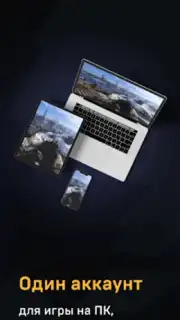
Imagine this: you’re on a commute or relaxing at a park, and instead of scrolling, you’re deep into a graphically demanding PC game. No bulky laptop, no expensive desktop—just your phone and a stable connection. This is the core proposition of VK Play Cloud, a mobile application that functions as a full-featured cloud gaming portal. It shifts the heavy computational workload to remote servers, streaming the video feed of high-end games directly to your Android device. The result is an experience that effectively decouples gaming performance from your local hardware, making it a compelling solution for accessing a vast library without the traditional hardware investment.
Technical Performance and Gameplay Mechanics
The service operates on a straightforward technical principle. Your inputs are sent to a powerful remote server, which renders the game and streams it back to your device in real-time. For this to feel responsive, a consistent internet connection is paramount. The platform specifies a minimum of 15 Mbps, but for optimal stability and reduced latency, a 5 GHz Wi-Fi network is strongly advised. The visual quality is contingent on your connection speed, with support for high-resolution streaming that can make modern titles look impressive on a mobile screen. To fully translate the PC experience, the use of external peripherals is recommended. Bluetooth gamepads or a keyboard and mouse connected via an OTG adapter provide the precise control schemes most of these games were designed for, moving beyond touchscreen compromises.
Library Integration and Access Model
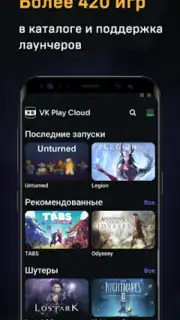
Where VK Play Cloud demonstrates significant flexibility is in its approach to game libraries. It hosts a built-in catalog of over 420 pre-installed PC titles, offering immediate one-tap access to a diverse range of genres. However, it doesn’t wall you into a closed ecosystem. The service allows for the installation and launching of games you own through external PC launchers. This means your existing digital library from other platforms can be integrated, ensuring your personal collection remains accessible. This hybrid model provides both curated, instant-access options and the freedom to play your already-purchased games, which is a notable advantage for seasoned gamers with existing investments in other stores.
The overall user journey is designed for minimal friction. Setup involves logging in with an existing account or creating a new one directly within the app, followed by selecting a suitable access plan. Once configured, the interface serves as a gateway to both the native catalog and your linked libraries. It’s worth noting that network management is part of the experience; for the lowest possible latency, avoiding other bandwidth-intensive activities like video streaming or large downloads during your gaming sessions is a practical tip.
- Cloud-Powered Performance: Stream demanding PC games in high resolution to your Android device by leveraging remote server hardware, eliminating the need for local processing power.
- Expansive Hybrid Library: Gain instant access to over 420 pre-installed titles and the ability to install and play games you own from external PC gaming platforms and launchers.
- Universal Hardware Compatibility: Function effectively on a wide range of Android devices (7.0 and above), from flagship models to more budget-friendly phones and tablets.
- Optimized Control Support: Enhance gameplay with full support for Bluetooth controllers or a keyboard and mouse connected via OTG for authentic PC gaming input.
- Streamlined Account and Access: Quickly start playing by signing in or creating a new account, then choose a plan to immediately browse and launch available games.
Transform your Android device into a portable gaming rig and claim your advantage now. Start exploring a vast world of PC gaming without boundaries or hardware limitations.
Heads up: you'll need a stable Wi-Fi connection (5 GHz recommended) for most features and optimal performance. Some cool stuff, including premium access plans, is extra.
Information
| Version | 1.83.93m |
| Developer | VK LLC |
| Requirements | Android Android + 7.0+ |
| Updated | 17.03.2026 |
| Size | 47.56 MB |
| Package | games.my.cloud |
| Signature | e62283d18018dc295bb1edf15c2707d3 |
| Architecture | arm64-v8a |


