

VPN Easy screenshots (4)


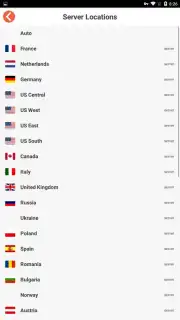

Description VPN Easy
Imagine a tool that dissolves digital borders with a single tap. VPN Easy operates on this principle, offering a streamlined gateway to the global internet without the typical configuration labyrinth. As a digital product reviewer, I’ve tested countless VPNs that promise simplicity, but few execute it with such a focused, no-nonsense approach. This application positions itself not as a complex security suite, but as a pragmatic conduit for unrestricted and private browsing, making its core functionality immediately accessible from the moment you launch it.
Core Functionality and User Experience
The operational mechanics of VPN Easy are deliberately minimalistic. Activation is a one-step process: engaging the prominent central connection button initiates the VPN tunnel. The application then presents a curated list of global server locations, acting as proxy endpoints. Selecting a desired country from this list triggers an automatic, rapid connection sequence, typically establishing a secure pathway within seconds. This design philosophy eliminates decision fatigue, translating a technically complex process into an intuitive user action. Once connected, your network traffic is rerouted through the chosen endpoint, effectively masking your real IP address and geographic location. This allows you to access web content as if you were physically present in that server's country, bypassing regional blocks, institutional firewalls, or government-mandated censorship that may be applied to specific websites or services.
Performance and Practical Advantages
In practice, this rerouting provides two primary, tangible benefits. First, it facilitates access to geographically restricted catalogs on streaming platforms, news outlets, or social media. Second, and perhaps more critically for general use, it establishes a layer of operational privacy for your browsing activities. By encrypting your connection and obscuring your digital origin point, VPN Easy makes it significantly more difficult for third parties—including network administrators, ISPs, or opportunistic data harvesters on public Wi-Fi—to monitor your online behavior or easily correlate your activity with your personal identity. The application promotes a browsing experience that is not only more open but also discretely shielded. For users seeking an even more optimized performance tier, the app offers a 'Turbo' mode, which is advertised to enhance connection speeds and provide an ad-free environment, suggesting a focus on reducing latency and streamlining the visual interface.
- One-Tap Global Connection: Initiate a secure VPN tunnel to any listed country server with a single press of the main button.
- Bypass Geo-Restrictions & Censorship: Access websites and services as if browsing from your selected server's location, circumventing regional blocks.
- Enhanced Browsing Privacy: Obscure your real IP address and encrypt traffic to help protect your personal data from easy interception on networks.
This level of streamlined access and foundational privacy is rarely so readily available. For a limited time, new users can secure exclusive access to the full capabilities of VPN Easy. This is a today-only opportunity to install the tool that redefines simple, secure browsing.
Download the VPN Easy mobile app now to unlock the global internet.
A standard internet connection is required for operation. The app may offer optional in-app purchases for premium features like Turbo mode.
Information
| Version | 2.2.0 |
| Developer | Vostok Soft FZC. |
| Requirements | Android Android + 4.0, 4.0.1, 4.0.2+ |
| Updated | 17.03.2026 |
| Size | 2.39 MB |
| Package | free.vpn.proxy.unblock.android.easy.app |
| Signature | c8735a8a93f60a98ac2b45931c26d8f8 |
| Architecture | armeabi-v7a |


