

Weather Master screenshots (12)
Description Weather Master
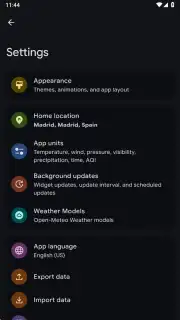
Looking for a weather application that provides comprehensive global forecasts without subscription fees or advertising interruptions? Weather Master is an open-source Android application that delivers detailed meteorological data through a fully customizable interface, drawing on multiple professional-grade sources for reliability.
Core Functionality and Data Sources
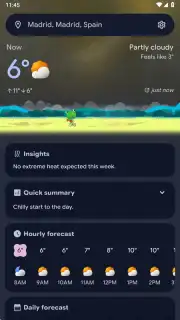
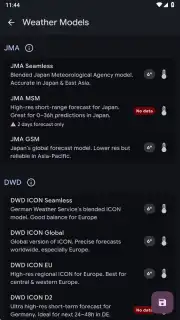
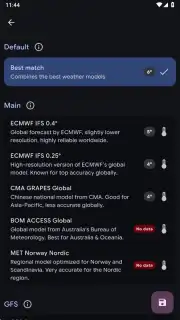
The application retrieves its weather data from the Open-Meteo API, which aggregates and processes information from a suite of established meteorological services. These providers include the UK Met Office (UKMO), the Royal Netherlands Meteorological Institute (KNMI), the Global Forecast System (GFS), the Japan Meteorological Agency (JMA), the Regional Agency for Prevention and Environment of Emilia-Romagna (ARPAE), and the German Weather Service (DWD). This multi-source approach is designed to enhance forecast accuracy and reliability for locations worldwide. The primary function allows users to check current conditions and forecasts for any city, with metrics covering temperature, precipitation probability, wind speed and direction, UV index, pollen levels, and precise times for sunrise and sunset.
Interface Customization and User Control
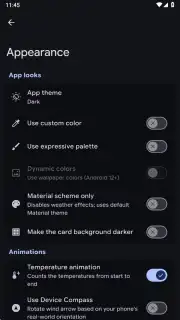
A significant operational focus is placed on user interface adaptability. Beyond a standard light/dark theme toggle, the application offers an extensive customization suite. Users can select from over fifty accent colors to alter the visual theme. Furthermore, the layout of information panels is not fixed; the order in which data points like temperature, humidity, or pollen count are displayed can be rearranged manually. The animated elements that accompany weather data, such as icons representing sun or cloud cover, can also be modified or adjusted in their behavior, allowing users to tailor the visual feedback to their preference.
Widget System and Home Screen Integration
The utility of a weather application is often measured by its home screen widget offerings. Weather Master provides a selection of widgets, approximately half a dozen in total, which vary in size and information density. These range from compact widgets displaying only the current temperature and condition icon to larger, more detailed formats that can show hourly forecasts, a multi-day outlook, or a combination of specific metrics like wind speed and humidity. This variety enables precise home screen configuration, granting immediate access to prioritized weather data without needing to open the full application.
Location Management and Detailed Metrics
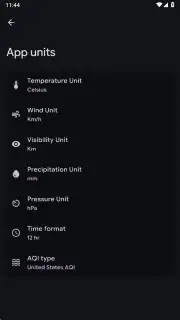
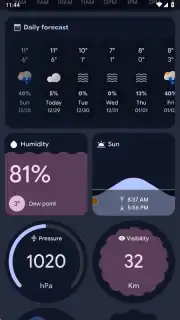
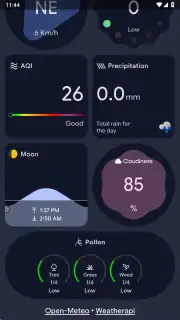
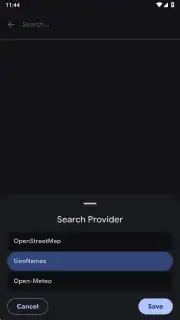
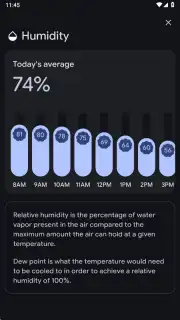
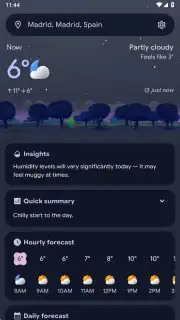
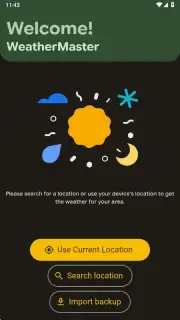
Location management is handled with standard flexibility. The application can automatically set a default location using the device's GPS for current conditions. Users can also manually add and save an unlimited number of additional cities for quick reference, which is practical for monitoring weather in multiple places of personal or professional interest. For each location, the detail screen presents a consolidated view of all available data. This includes a real-time temperature readout, a "feels like" temperature calculation, barometric pressure, visibility, dew point, and the specialized indices for UV exposure and allergen levels (pollen count), alongside the standard forecasts.
Operational Advantages and Practical Use
The combination of being free, open-source, and devoid of advertising constitutes its primary operational advantage. The absence of promotional banners or video ads ensures an uninterrupted view of meteorological data. The depth of customization available moves beyond superficial theming, affecting layout and data presentation order, which can streamline the user experience for individuals who track specific metrics like precipitation chance or wind gusts most frequently. The widget ecosystem directly supports at-a-glance information retrieval, which is a key efficiency for daily planning.
- Utilizes a multi-source data pipeline from professional meteorological agencies for enhanced forecast accuracy.
- Offers deep interface customization with over fifty color themes and adjustable data layout hierarchies.
- Provides a diverse set of home screen widgets in multiple sizes and information configurations.
- Displays comprehensive weather metrics including UV index, pollen levels, and detailed hourly forecasts.
- Operates as a completely free, open-source application with no advertising or subscription requirements.
We suggest trying Weather Master for a highly configurable and data-rich weather monitoring experience on your Android device. Consider downloading the application to access professional-grade forecasts without cost.
Internet required. IAP available.
Information
| Version | 2.7.1 |
| Developer | Pranshul |
| Requirements | Android Android + 6.0+ |
| Updated | 17.03.2026 |
| Size | 29.9 MB |
| Package | com.pranshulgg.weather_master_app |
| Signature | 8a17a9f878d3953956cb9c6e5fc25ac6 |
| Architecture | arm64-v8a |


