


X Icon Changer screenshots (5)



Description X Icon Changer
Your Phone Is a Canvas. It’s Time to Make It Uniquely Yours.
Tired of the same grid of identical, factory-default icons staring back at you every day? Your smartphone’s home screen should be a reflection of your personality, not a generic template. X Icon Changer transforms that static grid into a dynamic, deeply personal gallery. This isn't just about swapping a few images; it's about reclaiming the visual space you interact with most and injecting it with your own style, memories, and creativity. Imagine unlocking your device to a layout that feels genuinely yours, where every tap connects you to something meaningful.
Craft a Home Screen That Actually Feels Like Home
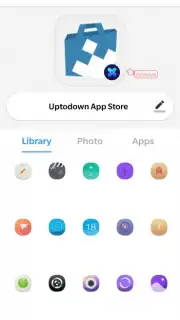
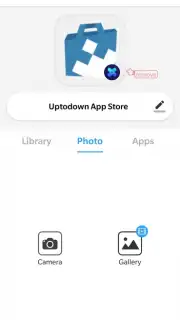
The core experience revolves around granting you complete visual authority over your app icons. The process is intuitive: select any app, then choose a new image from your personal gallery or create something entirely new. That favorite photo of your dog can become the icon for your messages app. A custom graphic you design can represent your banking app. The application handles the technical backend seamlessly, applying your chosen image as the new face of the app across your home screen and dock.
Beyond personal photos, the tool includes powerful utilities for fine-tuning your aesthetic. You have full control over cropping and framing for each selected image, ensuring the final icon is perfectly composed. An intelligent notification system prompts you to customize the icon of any newly installed app immediately, so your cohesive theme is never broken. For a playful twist, the icon swap feature lets you exchange the icons of two different apps with a single tap, a clever way to organize or simply surprise yourself.
Why This Tool Becomes an Essential Part of Your Setup
- Unlimited Personal Gallery Integration: Use any photo, screenshot, or digital artwork stored on your device as a custom app icon. Your memories and creations become functional parts of your interface.
- Complete App Renaming Freedom: Change not just the icon, but also the label beneath it. Discreetly rename apps for privacy or simply for fun, making your device truly cryptic or clearly organized.
- Instant New-App Integration: The app proactively detects new installations and asks if you’d like to design a custom icon for them right away, maintaining a consistent themed environment from the start.
- Precision Image Editing Tools: Adjustable cropping and framing options are built directly into the selector, allowing you to zoom, position, and perfect every icon before applying it.
- One-Tap Icon Swapping: Quickly swap the visual identities of two applications, a useful feature for thematic grouping or just experimenting with new layouts without starting from scratch.
- Streamlined, Ad-Free Experience: Focus purely on creation. The interface is designed to be clean and unobtrusive, keeping the process about personalization, not interruptions.
This is more than an app; it's the master key to a phone that no one else has. The standard icons are gone, replaced by a visual language you define. Every time you reach for your phone, you'll experience a interface curated by you, for you. That sense of ownership and daily delight is what turns a utility into a necessity.
Ready to erase the generic and build your signature look? Exclusive early access to the latest premium features is available for a limited time to new users. Download X Icon Changer now and transform your device today—your home screen is waiting for your vision.
Disclaimer: This application requires an internet connection for initial download and certain functions. Some advanced features or themes may be available via in-app purchases. The app creates custom shortcuts; original app icons may still appear in your device's full application list or settings menus.
Information
| Version | 4.5.2 |
| Developer | ASTER PLAY |
| Requirements | Android Android + 5.0+ |
| Updated | 17.03.2026 |
| Size | 38 MB |
| Package | io.hexman.xiconchanger |
| Signature | 10b00bb2f9cfcf38b10659a41b40d383 |
| Architecture | armeabi-v7a, arm64-v8a |


