


YouTube (Android Auto) screenshots (9)




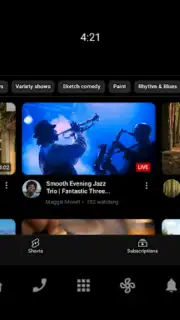



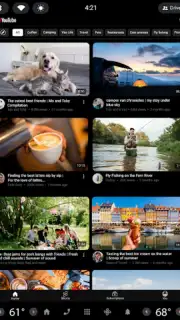
Description YouTube (Android Auto)
A Practical Review of YouTube for Android Auto
Imagine a scenario where your daily commute transforms from a passive interval into a curated media session, with your vehicle's dashboard serving as the portal. This is the operational premise of YouTube (Android Auto), a specialized application variant developed by Google LLC. It functions not as a standalone video player, but as a streamlined interface that projects and manages YouTube's vast content library onto your car's infotainment display via the Android Auto protocol. The core utility lies in extending your established YouTube ecosystem—subscriptions, watch history, personalized algorithms—into the automotive environment, repurposing drive time for audio-focused entertainment, news digestion, or educational content consumption without requiring direct interaction with a mobile device.
Feature Integration and In-Car Usability
The application's architecture is built around three primary access points mirrored from the main YouTube service: Subscriptions, Library, and Home. The Subscriptions feed aggregates the latest uploads from channels you follow, providing a linear, update-focused stream. The Library section offers direct access to your playlists, 'Watch Later' saves, and previously viewed videos. The Home tab generates a feed of recommended content based on your viewing history and preferences. A key functional differentiator is the integrated Explore feature, which surfaces trending videos from global and niche communities, spanning categories like music releases, gaming commentary, or tutorial content. This system is designed for primarily auditory engagement, with the video component often secondary during motion.
Safety Protocols and Interactive Elements
A critical design consideration is driver distraction mitigation. The application employs context-aware restrictions, typically limiting full video playback to when the vehicle is stationary. During travel, the interface prioritizes audio playback, thumbnails, and metadata. Despite these safeguards, certain interactive elements remain accessible. Users can engage with live chat during premieres or streams, and view comment sections, maintaining a degree of community participation. This creates a hybrid experience: a lean-back, audio-forward stream for driving, switching to a more visual, interactive mode when parked.
Core Functionalities at a Glance
- Direct access to subscription feeds
- Personalized recommendation algorithms
- Explore trending global content categories
- Audio-focused playback during vehicle motion
The application serves as a conduit, not a source. Its performance and content depth are intrinsically tied to your primary YouTube account and the stability of your mobile data connection. For users deeply embedded in the YouTube ecosystem, it effectively eliminates the gap between home and road, turning a connected car into a seamless extension of their media consumption habits.
Download the YouTube (Android Auto) app now to integrate your digital media landscape directly into your driving experience.
Heads up: you'll need a stable mobile data connection or WiFi for streaming. Full video playback is often restricted while the vehicle is in motion for safety. The availability of certain features like YouTube Premium benefits (e.g., ad-free viewing, background play) requires a separate subscription.
Information
| Version | 2.188.796573650 |
| Developer | Google LLC |
| Requirements | Android Android + 10+ |
| Updated | 17.03.2026 |
| Size | 49.65 MB |
| Package | com.google.android.apps.automotive.youtube |
| Signature | 58494245718949d9ca7b7fd5af2027b9 |
| Architecture | universal |


