

ZDbox screenshots (6)
Description ZDbox
A Comprehensive Look at ZDbox: The Android Swiss Army Knife
Every Android user has experienced that moment of frustration—a device slowing down, storage mysteriously filling up, or battery life plummeting before the day is done. Traditionally, addressing these issues meant juggling multiple specialized apps, each with its own interface and learning curve. ZDbox, developed by ZDworks Co., Ltd., presents itself as a unified solution to this common problem. This review examines version 4.2.462 of this all-in-one toolbox, not as a miracle cure, but as a practical, centralized dashboard for system management. Its core proposition is to consolidate a wide array of optimization, security, and file management tools into a single, streamlined application, aiming to reduce digital clutter while providing tangible control over the device's performance and resources.
Detailed Feature Analysis and Performance Mechanics
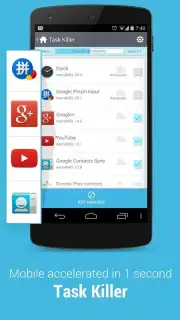
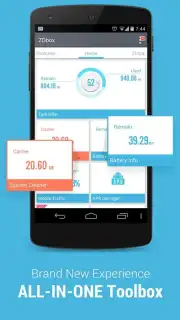
The application’s interface is logically segmented, offering immediate access to its suite of tools without overwhelming the user. The performance optimization module is particularly robust. It goes beyond simple cache cleaning by providing a detailed breakdown of system resource consumption. The one-tap task killer is effective for closing background processes, but the more valuable feature is the deep cache cleaner that targets residual files from apps and the system itself, reclaiming storage space that is often overlooked by standard cleaners. The one-touch battery saver mode is not just a toggle; it executes a predefined set of power-saving actions, such as throttling background data and reducing screen timeout, which can measurably extend usage time during critical periods.
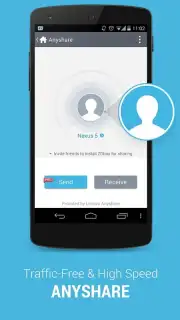
File management and transfer are handled with notable efficiency. The built-in file sharer utilizes a local Wi-Fi Direct or hotspot connection, enabling transfers between Android devices at speeds that genuinely outpace traditional Bluetooth, making the movement of large video files or application packages a matter of seconds rather than minutes, all without consuming mobile data. For privacy, ZDbox offers granular control. The Do Not Disturb scheduler can be configured with custom rules, while the app locker function allows users to password-protect or pattern-lock sensitive applications like gallery apps or messaging clients, adding a necessary layer of security beyond the device's main lock screen.
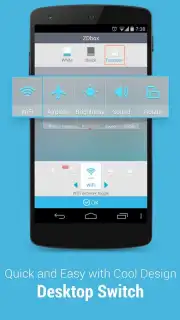
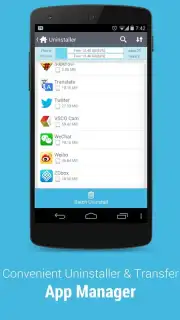
For users who demand detailed analytics, the app provides comprehensive system monitors. The battery information panel displays voltage, temperature, and health estimates, while the data usage counter tracks mobile and Wi-Fi consumption against customizable limits. The inclusion of configurable system widgets offers quick toggles for settings like Bluetooth, flashlight, and screen rotation directly from the home screen. For advanced users with rooted devices, ZDbox unlocks deeper functionality, including a root-level task manager for terminating persistent system processes and tools for batch migrating applications to an SD card to free up internal storage—a feature becoming rarer in modern Android versions.
- Advanced System Optimization: Features a deep cache cleaner and one-tap task killer to free up RAM and storage, improving overall device responsiveness and speed.
- High-Speed File Sharing Tool: Enables direct, ad-hoc wireless file transfers between Android devices at speeds significantly faster than standard Bluetooth, without using internet data.
- Integrated Privacy & Security Suite: Combines a configurable Do Not Disturb mode with a dedicated app locker to protect sensitive applications using passwords or pattern locks.
Final Assessment and Value Proposition
ZDbox positions itself as a comprehensive utility belt for Android, and for the most part, it delivers on that promise. Its strength lies in its consolidation; it removes the need for five or six disparate single-purpose apps. The performance gains from its cleaning tools are tangible, especially on devices with limited RAM or older storage modules. The file transfer utility is a standout feature for anyone who regularly moves data between phones or tablets. While no single tool is necessarily best-in-class compared to standalone premium alternatives, the convenience and cohesion of having them all in one place, working from a unified interface, present a compelling argument. It is a practical choice for users seeking to maintain their device's performance and organization without delving into complex, technical settings menus.
Download the ZDbox mobile app now to unlock a limited-time offer: exclusive, ad-free access to the Turbo optimization features for the first 10,000 users. This is a today-only opportunity to experience maximum device performance without interruptions.
Internet required. IAP available.
Information
| Version | 4.2.462 |
| Developer | ZDworks Co.,Ltd. |
| Requirements | Android Android + 1.6+ |
| Updated | 17.03.2026 |
| Size | 9.91 MB |
| Package | com.zdworks.android.toolbox |
| Signature | 3a70d6571357c3b39e73835a1d3511c4 |
| Architecture | armeabi, armeabi-v7a, x86, arm64-v8a, x86_64 |


