

ZXReader screenshots (3)

Description ZXReader
Looking for a reading app that handles every format you throw at it without drowning you in ads? ZXReader positions itself as a comprehensive, user-configurable reading platform for Android, focusing on deep customization and format flexibility rather than a locked-in ecosystem. Its core proposition is direct file management and a reading environment you can tailor down to the smallest detail.
Core Functionality and Format Support
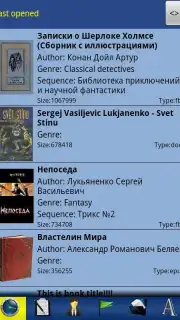
ZXReader operates primarily as a local file reader with robust online catalog browsing. Its foundation is exceptional format compatibility, natively opening TXT, FB2, DOCX, EPUB, and HTML files. It can also directly access these files when they are packaged inside ZIP archives, eliminating an extra extraction step. For expanding your library, integrated OPDS support provides a gateway to numerous free online libraries, allowing you to search, browse, and download new titles directly within the app. Text encoding is handled intelligently with automatic detection for Unicode, UTF-8, Win-1251, and KOI8-R, ensuring Cyrillic and other character sets display correctly without manual intervention.
The Customizable Reading Experience
The reading interface is dynamic and highly adjustable. The app supports automatic rotation between portrait and landscape modes but allows you to lock the orientation to your preference. A true full-screen mode removes all distractions for immersion. Navigation is gesture and tap-based, with configurable on-screen tap zones. You can assign different commands—like page forward, page back, or menu open—to specific areas of the screen. Jumping within a book is facilitated through a detailed table of contents or a precise percentage-based scroll bar.
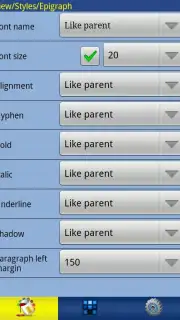
Personalization is where ZXReader dedicates significant depth. You are not limited to a few preset themes. You can independently customize the font (including loading custom TTF files from your device), text size, line spacing, and margins. Color customization extends to the text, background, and selection highlight. For further uniqueness, you can set a background image for your reading pane. The app respects embedded graphics within documents, displaying images and formatted content as intended.
Advanced Comfort and Profile Management
Beyond visual settings, ZXReader offers system-level adjustments for reading comfort. Its built-in brightness control operates independently from your Android system settings, allowing you to set the screen dimmer than the system minimum—a critical feature for night reading. You can also configure the backlight timeout specifically for the app. To manage these myriad settings, the app supports multiple user-defined profiles. You can create and switch between distinct profiles—for example, a "Day" profile with a serif font and white background, and a "Night" profile with a sans-serif font, sepia background, and ultra-low brightness—instantly applying a complete configuration suite.
- Extensive Format Library: Directly opens TXT, FB2, DOCX, EPUB, HTML, and files within ZIP archives.
- Fully Customizable Interface: Personalize fonts, colors, spacing, and even set custom background images.
- Independent Comfort Controls: Adjust brightness below system minimum and manage backlight timeout per reading session.
We suggest trying ZXReader if you possess a diverse personal ebook library and prioritize granular control over your reading environment above all else. Consider downloading it to transform your device into a truly personalized digital book reader.
Internet required for OPDS. IAP available.
Information
| Version | 2.6.9 |
| Developer | ZXStyles |
| Requirements | Android Android + 6.0+ |
| Updated | 17.03.2026 |
| Size | 2.26 MB |
| Package | ZXStyles.ZXReader |
| Signature | e58854933ae133fdaab6999888eb542a |
| Architecture | armeabi-v7a, x86, arm64-v8a, x86_64 |


