

App Locker screenshots (9)



Description App Locker
A Dedicated App Locker Provides Essential, Straightforward Security for Any Android Device
In an environment where mobile privacy is often compromised by casual access, a dedicated application locker is no longer optional but a fundamental utility. App Locker by Mongolian Lab functions as a core system tool, implementing a direct access barrier for selected apps and media files. Its operation is rooted in a password-gated mechanism, requiring authentication before any protected content can be launched. This review examines its functional mechanics and implementation.
Core Functionality and Operational Analysis
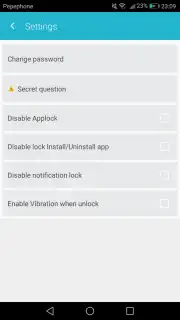
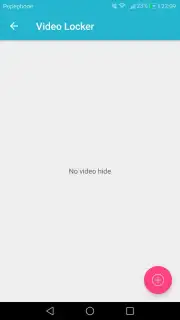
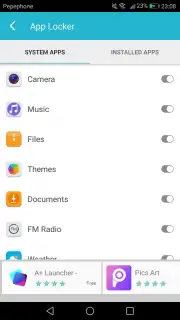
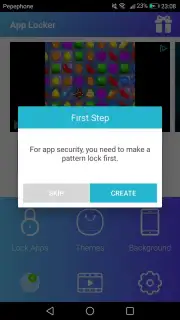
The application's primary function is to impose a secondary authentication layer on top of the device's native security. Upon initial launch, the user is required to configure a master password or PIN. This credential acts as the singular key for all subsequently protected items. The locking process itself is administrative: users navigate to a management screen within App Locker to manually select applications from a device-wide list. Once added, any attempt to open those apps from the home screen or recent tasks menu triggers the lock screen. The system also extends beyond applications to local video files, allowing them to be secured within the same ecosystem and accessed solely through the locker's interface. A notable operational point is the advertised "Turbo" mode, which is presented as enhancing performance and eliminating advertisements during use, suggesting a freemium model with a paid upgrade path.
Feature Breakdown
- Master Password Protection: Establishes a single, user-defined password or PIN as the primary authentication method for all secured content.
- Per-App Locking: Allows selective protection of any installed application by adding it to a managed list within the utility.
- Media File Security: Extends locking functionality to locally stored video files, requiring password access for playback.
- Centralized Management Interface: Provides a unified dashboard for adding, removing, and managing all locked applications and files.
- Ad-Free Turbo Mode: An optional enhanced operational mode designed to remove advertisements and potentially improve system performance.
We suggest trying App Locker if your primary requirement is a no-frills utility that adds a basic but effective permission layer to specific apps without complex configurations. Consider downloading it for straightforward, application-level privacy control.
An active internet connection may be required for initial functionality verification and optional features. The application may offer in-app purchases for premium functionality, such as the Turbo mode.
Information
| Version | 1.0.17 |
| Developer | Mongolian Lab |
| Updated | 17.03.2026 |
| Size | 5.07 MB |
| Package | com.security.applock.pro |
| Signature | c7921171ea1f6020c915d21dd877c226 |


