

AVG TuneUp screenshots (4)

Description AVG TuneUp
AVG TuneUp is a focused utility suite designed to reclaim your Android device's performance and battery life through direct, granular control.
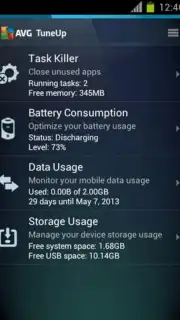
This application operates not as a single automated tool, but as a consolidated dashboard of four distinct utilities. Each utility provides specific, manual oversight over the core system resources that most commonly degrade performance and drain battery. The approach is hands-on: it surfaces detailed information about your device's operations, empowering you to make informed decisions to terminate or manage resource-hungry processes. The absence of in-app advertisements ensures the interface remains clean and the tools are immediately accessible, removing friction from the optimization process. By systematically addressing battery consumers, background data usage, and memory allocation, the app facilitates a tangible improvement in device responsiveness and endurance.
Core Functionality and Analytical Tools
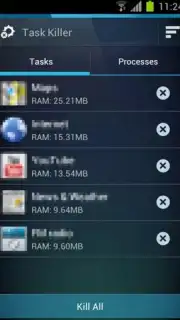
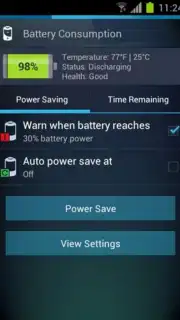
The effectiveness of AVG TuneUp stems from its compartmentalized design. Each of the four primary tools serves a dedicated diagnostic and management purpose, moving beyond vague "boosting" claims to offer concrete control points. The Process Killer utility provides a real-time list of running applications and services, complete with their individual impact on CPU and memory, allowing for selective termination of non-essential tasks. The Battery Consumption Indicator breaks down power usage per app, highlighting which software is responsible for the most significant drain, both actively and in the background. This data is critical for identifying apps that may require settings adjustments or more disciplined usage patterns.
Complementing these are the Data Usage Monitor and the Device Memory Manager. The monitor tracks mobile and Wi-Fi data consumption across applications, helping to prevent unexpected overage charges and identifying data-siphoning apps. The memory utility visualizes your device's RAM usage, showing how much is occupied and what is free, and provides a one-touch method to clear cached data and halt background processes that consume this vital resource. The interplay between these tools is key; managing memory often directly impacts battery life, while controlling background data can also curb battery drain. The app requires your active engagement—you review the data it provides and execute the recommended actions—resulting in a tailored optimization specific to your installed software and usage habits.
- Targeted Process Termination: Manually close any running application or background service shown to be consuming excessive CPU or memory resources.
- Granular Battery Analytics: View a detailed breakdown of battery consumption by individual apps to identify and manage primary sources of drain.
- Comprehensive Data Monitoring: Track real-time and historical mobile/Wi-Fi data usage per application to prevent overages and control costs.
- Active Memory Management: Visualize RAM allocation and instantly clear cached processes to free up system memory for improved performance.
- Ad-Free Optimization Environment: Execute all tuning and management tasks within a clean interface completely free of banner or video advertisements.
We suggest trying AVG TuneUp if you prefer a transparent, information-driven approach to device maintenance over fully automated solutions. Consider downloading it for direct control over the factors affecting your phone's battery longevity and smooth operation.
Download the AVG TuneUp mobile app now.
Disclaimer: This application requires an internet connection for initial download and potential updates. It requires permissions to monitor device processes, battery, and data usage to function. Performance improvements may vary based on device model, age, and installed software. Always review app permissions before use.
Information
| Version | 1.1.1 |
| Developer | AVG Mobile |
| Updated | 17.03.2026 |
| Size | 3.22 MB |
| Package | com.avg.tuneup |
| Signature | 01d5d4d27125e3bdd535eb3480f38dcf |


