


Call Recorder - callX screenshots (6)
Description Call Recorder - callX
A Practical Look at Automated Call Recording
In the realm of Android utilities, applications that automate routine tasks often provide the most tangible value. Call Recorder - callX positions itself as a set-and-forget solution for capturing both incoming and outgoing phone conversations. The core proposition is automation; once configured, the application operates in the background without requiring manual initiation for each call. This review examines its operational mechanics, configuration depth, and the practical considerations for potential users.
Functional Analysis and Configuration
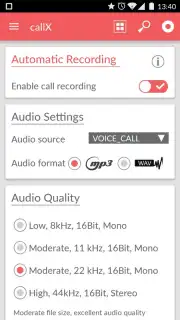
The application’s primary function is automatic recording, but its utility is defined by its customizable parameters. Users can adjust the audio quality of recordings, which directly impacts file size and clarity. The output format is selectable between MP4 and WAV, catering to different needs for compression or uncompressed audio fidelity. A critical setting is the audio source selection, which determines whether the recording captures the user's voice, the caller's voice, or both ends of the conversation. Recordings are saved to a user-designated folder for organized local storage.
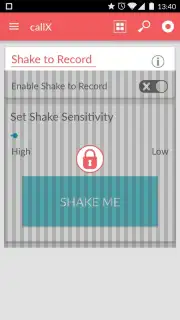
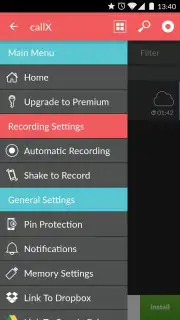
An alternative manual control mode is available, where the automatic function is disabled. In this mode, recording is triggered by physically shaking the device during an active call. This provides a discrete method for selectively capturing specific conversations without maintaining a full log. It is important to note that functionality can vary across the diverse Android hardware ecosystem. In cases where recording fails, a common troubleshooting step is to experiment with the audio source setting, as the default 'Voice Call' source may not be compatible with all device architectures.
Key Feature Specifications
- Configurable audio quality settings for balancing clarity and storage use.
- Choice of output formats between compressed MP4 and lossless WAV.
- Selectable audio source to control which side of the conversation is recorded.
- Manual activation mode triggered by a shake gesture during calls.
- Local storage management with user-defined save folder location.
We suggest trying Call Recorder - callX for a hands-on evaluation of its automated recording system on your specific device.
Download mobile app now
Disclaimer: This application requires an active internet connection for initial download and potential updates. It may contain in-app purchases for premium features. Functionality is dependent on device hardware and operating system compatibility. Users should be aware of and comply with local laws regarding call recording and consent. The app may require permissions to access phone audio and storage.
Information
| Version | 10.9 |
| Developer | SMSROBOT LTD (Auto Call Record |
| Requirements | Android Android + 4.4+ |
| Updated | 17.03.2026 |
| Size | 17.08 MB |
| Package | com.smsrobot.callrecorder |
| Signature | bccd9dd7e0e10b91b3fff8e6f7a55a82 |
| Architecture | armeabi, armeabi-v7a, arm64-v8a |


