

Halo Browser screenshots (10)









Description Halo Browser
Looking for a browser that strips away the clutter and puts speed and simplicity first? Meet Halo Browser, a streamlined mobile browser designed for users who value a clean interface and control over their browsing experience. It transforms how you interact with the web by giving you powerful tools to block intrusive elements and accelerate page loads directly from an intuitive, attractive home screen.
Core Functionality and User Control
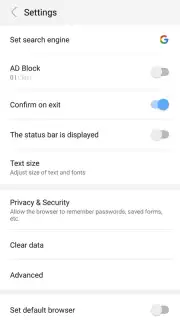
Halo Browser distinguishes itself with proactive features that tackle common web frustrations head-on. Upon launching the app, you are immediately presented with the option to activate its built-in ad filter. This system-level tool blocks advertising content across the sites you visit, eliminating pop-ups, banners, and video ads that interrupt your reading. For maximum performance gains, you can enable the data-saving mode which halts the automatic loading of images. This function drastically reduces data consumption and can make pages render significantly faster, especially on slower connections or media-heavy websites. Both the ad blocker and image loader can be toggled on or off with just a couple of taps in the settings, providing granular control for each browsing session.
Essential Tools for Daily Browsing
Beyond its standout optimization features, Halo Browser is equipped with all the essential tools required for secure and convenient daily use. A dedicated Incognito Mode ensures your browsing history, cookies, and site data are not stored locally. You can organize your go-to sites with a customizable favorites system and revisit past pages through a comprehensive history viewer. These core functionalities mean you can confidently replace your current default browser without sacrificing the tools you rely on, while gaining enhanced privacy and a noticeable boost in page load performance.
- Built-in ad blocker for clean pages
- Toggle image loading for faster speeds
- Incognito Mode for private sessions
- Favorites and history management
We suggest trying Halo Browser to experience a noticeably faster, cleaner, and more controlled way to surf the web on your mobile device. Consider downloading it today and feel the difference.
Disclaimer: This app requires an internet connection. Some features or future updates may be subject to in-app purchases.
Information
| Version | 1.0.35 |
| Developer | Fantastic Tools & Emoji ke |
| Requirements | Android Android + 4.1, 4.1.1+ |
| Updated | 17.03.2026 |
| Size | 3.03 MB |
| Package | com.halo.browser |
| Signature | ff4431e7efbfd0833cf6afd44ef04028 |
| Architecture | armeabi-v7a |


