

Moony Blue Light Filter screenshots (3)

Description Moony Blue Light Filter
Looking for a way to reduce eye strain from your phone's screen without cluttering your interface? Moony Blue Light Filter provides a streamlined, single-window solution for adjusting screen color temperature and brightness beyond your device's standard settings.
Core Functionality and Interface
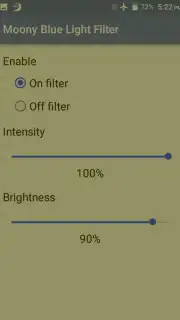
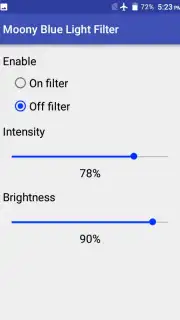
The application operates from a centralized control panel. A master toggle switch at the top activates or deactivates the blue light filter. Directly below, a horizontal slider allows for precise adjustment of the filter's intensity, letting you select the exact level of color warmth suitable for your environment or time of day. A separate brightness adjustment slider is available for users who find the system's minimum brightness setting insufficient; dragging this control to the left further dims the backlight for use in very dark conditions or for enhanced comfort. Once the filter is active, a persistent notification shade shortcut is created, offering immediate access to these adjustment parameters without needing to reopen the main application.
Key Features at a Glance
- Single-window control panel for all settings
- Adjustable blue light filter intensity slider
- Independent sub-system brightness reduction
- Quick-access notification toggle for live adjustments
Download the Moony Blue Light Filter app now—exclusive, ad-free access is a limited-time offer for new users.
Heads up: you'll need wifi for initial download. Some advanced display modes may be part of future updates.
Information
| Version | 1.0.0 |
| Developer | Mananpa Apps |
| Requirements | Android Android + 10+ |
| Updated | 17.03.2026 |
| Size | 3.1 MB |
| Package | mananpa.bluelight.filter |
| Signature | 373e512f28b37252931442a2669d795b |


