

Sliding Explorer screenshots (6)



Description Sliding Explorer
What Does a Modern File Manager Actually Need to Do?
In a category often dominated by cluttered interfaces and overwhelming feature sets, Sliding Explorer by Team Baller Applications presents a focused alternative. It asks whether core file management—browsing, organizing, and compressing data—can be executed with both clarity and visual polish. The app operates on a principle of restrained functionality, prioritizing a reliable and aesthetically considered user experience over an exhaustive checklist of tools. This review examines whether this streamlined approach delivers sufficient utility for the average user seeking control over their device's storage without unnecessary complexity.
Core Functionality and Interface Design
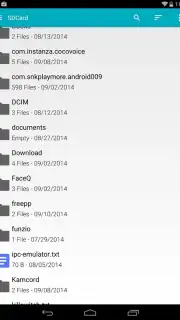
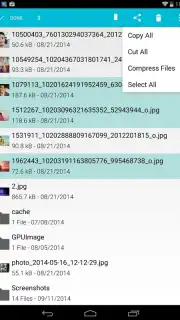
Sliding Explorer provides fundamental file operations with a notable emphasis on a clean workflow. The application grants full access to the device's directory structure, enabling users to create, rename, copy, and paste files and folders. Its handling of archive files is straightforward: you can open ZIP archives to inspect contents and create new ZIP files from selected items, a practical feature for bundling documents or media. A significant operational advantage is its batch processing capability; moving entire folders or, for instance, selecting all photos from a directory to transfer elsewhere is executed efficiently, minimizing repetitive actions.
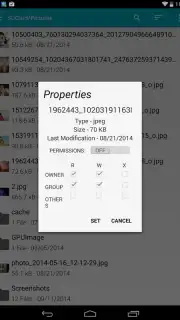
The interface is built upon Material Design principles, which translates to predictable gestures, coherent iconography, and a layered visual hierarchy. This design philosophy is not merely cosmetic; it directly informs usability. Navigating through folders feels intuitive, with sliding panels and clear visual feedback. The properties panel for any file displays essential metadata—format, size, name—and allows for the modification of necessary system permissions. While the feature set is deliberately narrower than some comprehensive competitors, each action feels intentional and integrated into the cohesive whole of the app's environment.
Key Features at a Glance
- Full device storage access and navigation
- Create, rename, copy, and paste operations
- Open and create ZIP archive files
- Batch selection and management for files
The absence of advertising, as noted in the app's description, contributes to an uninterrupted workflow, which is a critical factor in a utility tool. For users whose primary requirements are reliable organization, basic compression, and a pleasant, distraction-free interface, Sliding Explorer establishes a competent foundation. It demonstrates that effective file management can be achieved through thoughtful design and execution of essential features rather than sheer volume of options.
We suggest trying Sliding Explorer if your priority is a streamlined, visually coherent tool for everyday file tasks. Consider downloading the app to experience its focused approach to device management.
Download the Sliding Explorer mobile app now.
Internet required. IAP available.
Information
| Version | 0.5.3 |
| Developer | Team Baller Applications |
| Requirements | Android Android + 4.0.3, 4.0.4+ |
| Updated | 17.03.2026 |
| Size | 1.78 MB |
| Package | com.ballerapps.slidingexplorer |
| Signature | c22f7724d1e04d5524b8925291bed0d6 |


